
Call us now :07971191065
 Send Inquiry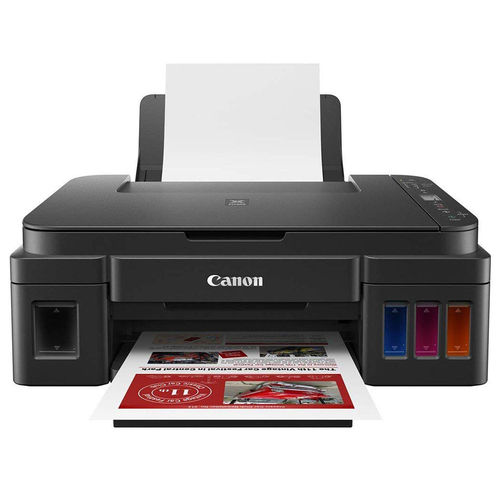
Canon Pixma G3012 Printer
14785 INR
Product Details:
- Paper Size A4, Letter, Legal, A5, B5, A6, Envelope (DL, COM10), 4 x 6, 5 x 7, 8 x 10
- Pattern Standard
- Color Black
- Weight 6.3 kg
- Model No Pixma G3012
- Power Source AC 100-240V, 50/60Hz
- Noise Level Approx. 52.0 dB(A)
- Click to View more
X
Canon Pixma G3012 Printer Price And Quantity
- 14785 INR
- 1 Piece
Canon Pixma G3012 Printer Product Specifications
- 6.3 kg
- Dye and Pigment-based (GI-790 Black, Cyan, Magenta, Yellow)
- Black
- USB 2.0, Wi-Fi, Wireless LAN, Mobile Printing
- Approx. 8.8 ipm (black) / 5.0 ipm (color)
- Standard
- A4, Letter, Legal, A5, B5, A6, Envelope (DL, COM10), 4 x 6, 5 x 7, 8 x 10
- Ink Tank (GI-790 Series) Inkjet
- All-in-One Ink Tank Printer
- 445 x 330 x 163 mm
- Approx. 52.0 dB(A)
- High-capacity ink tank system, up to 7,000 pages (color) / 6,000 pages (black)
- 2022
- Canon
- Ready Stock
- Home, Office, Small Businesses
- AC 100-240V, 50/60Hz
- Store in a cool, dry place
- Print, Copy, Scan, Wireless Printing, High Yield Ink Tanks, Borderless Photo Printing, LCD Display
- Pixma G3012
- 163 mm
- Inkjet
- Print, Copy, Scan
- Up to 600 x 1200 dpi (optical)
- GI-790 Series Bottles
- Windows 10/8.1/7 SP1, Mac OS X v10.10.5~v10.13
- Up to 100 sheets (plain paper)
- Approx. 11W (operation) / 0.6W (standby)
- 1.2 inch segment mono LCD
- Up to 3,000 pages per month
- Supported (Canon PRINT app, Google Cloud Print, Mobile/Tablet printing)
- Approx. 11 seconds (black), 17 seconds (color)
- 600 x 600 dpi
Canon Pixma G3012 Printer Trade Information
- 2 Days
- Asia
- All India
Product Description
Product Description:- Printer Type - Ink Tank, Functionality - All-in-One (Print, Scan, Copy), Printer Output - Color
- Connectivity - Wi-Fi, USB, Canon Selphy App (Direct Mobile Printing), Display - 1.2" LCD
- Pages per minute - 8.8 pages (Black & White), 5 pages (Colour), Cost per page - 8 paise (Black & White), 21 paise (Colour) - As per ISO standards
- Ideal usage - Home and Small office, Regular / Heavy usage (more than 300 pages per month)
- Page size supported - 4.0"x6.0" till A4 / Letter / Legal / A5 / B5, Duplex Print - Manual, Print resolution - 4800x1200
- Compatible Ink Bottle - GI-790 (Black), GI-790 (Cyan, Magenta, Yellow), Page Yield - 7000 pages, Comes with 1 each of all 4 ink bottles inside the box, additional 2 black ink bottles inside the box.
Details
| Brand | Canon |
| Colour | Black |
| Item Height | 16.3 Centimeters |
| Item Width | 44.5 Centimeters |
| Item Weight | 6 Kg |
| Product Dimensions | 33 x 44.5 x 16.3 cm |
| Item model number | CNN_G3012_BLK |
| Connectivity Type | Wi-Fi |
| Wattage | 11 Watts |
| Included Components | Printer |
Superior Ink Efficiency for High-Volume Printing
The Pixma G3012s integrated ink tank system uses GI-790 series bottles, giving users up to 7,000 color or 6,000 black pages per refill. This incredible yield lowers running costs and minimizes the hassle of frequent ink replacement, making it ideal for busy environments where consistent, high-quality prints are essential.
User-Friendly Features and Wireless Convenience
This model provides smooth navigation through its 1.2-inch segment mono LCD panel, streamlining tasks like copying and scanning. With direct wireless printing enabled via the Canon PRINT app, Google Cloud Print, and mobile devices, the G3012 offers flexible, cable-free operationperfect for dynamic workplaces and home settings.
Versatility Across Multiple Media and Devices
Supporting a variety of paper sizesincluding A4, legal, envelopes, and photo formatsthe Pixma G3012 adapts effortlessly to diverse printing needs. Compatible with both Windows (10/8.1/7 SP1) and Mac OS X (v10.10.5v10.13), it ensures seamless integration across most devices, meeting the needs of professional and personal users alike.
FAQs of Canon Pixma G3012 Printer:
Q: How do I print wirelessly from my smartphone using the Canon Pixma G3012?
A: You can print wirelessly from your mobile device by connecting the printer to Wi-Fi and using the Canon PRINT app or Google Cloud Print. Simply install the respective app, ensure your device and printer are on the same Wi-Fi network, and select documents or photos to print directly from your phone or tablet.Q: What is the process for refilling the ink tanks on the Pixma G3012?
A: Refilling the ink tanks is straightforward: open the ink tank covers, insert the corresponding GI-790 series bottle, and carefully pour ink until reaching the marked fill line. The high-capacity tanks require infrequent refills and help prevent messy cartridge changes, supporting uninterrupted operation.Q: Where can the Canon Pixma G3012 be used most effectively?
A: This printer is designed for home, office, and small business environments. Its compact size and versatile functionality make it ideal for spaces needing reliable document or photo printing, high-volume output, and convenient wireless access without occupying excessive room.Q: What types of paper and sizes does the Pixma G3012 support?
A: The printer accommodates a wide range of paper sizes, including A4, Letter, Legal, A5, B5, A6, photo formats (4x6, 5x7, 8x10), and envelopes (DL, COM10). Its flexible input tray holds up to 100 plain sheets for various tasks, from reports to borderless photos.Q: When should I expect the first print-out after sending a job to the G3012?
A: For black and white documents, the first print-out is typically ready in approximately 11 seconds. Color prints take around 17 seconds. These quick start times improve workflow productivity and reduce waiting for urgent jobs.Q: What are the benefits of the high-yield ink bottles in the G3012?
A: High-yield GI-790 ink bottles provide thousands of pages per refill, dramatically reducing replacement frequency and total cost of ownership. This system supports intensive printing demands and offers dependable output quality for both text and photos.Q: How do I keep my Canon Pixma G3012 running smoothly?
A: To ensure optimal performance, regularly check ink levels and refill promptly. Store the printer in a cool, dry place, follow manufacturer-recommended maintenance routines, and use genuine Canon ink for best results. Cleaning the print head and updating software also contribute to longevity and print quality.Tell us about your requirement

Price:
Quantity
Select Unit
- 50
- 100
- 200
- 250
- 500
- 1000+
Additional detail
Mobile number
Email

Other Products in 'Cartridges & Printers' category


"We are accepting local inquiries only for South India."

 Send Inquiry
Our Products
- Garbage Bins & Covers
- Paper shredder & lamination Machine
- Wipers
- Mop & Accessories
- Cleaning Cloths
- Boards
- Buckets
- Liquid Chemicals
- Cleaning Powder
- Brush
- Tissues
- Newspaper Stand
- Brooms & Dustpan
- Cups & Mugs
- Air fragrance & Dispenser
- Safety items
- Vacuum Cleaners
- Currency Counting And Shredding Machine
- Batteries
- Label Manager
- Projectors & Stands
- Foldable Table
- MONITOR ARM SOLUTIONS
- Monitor Stands
- Keyboard Drawers
- Computer Accessories
- Water Bottles
- Safety Equipments
- Projector & Projector Accessories
- Disposable Items
- Boards & Accessories
- Cleaning Chemicals
- Scrubbers
- Hand Wash Dispenser
- Hand Dryer Dispenser
- Tissue Dispenser
- Mat
- Water Bottle
- Cutlery
- Magazine Stands
- Ceramic Boards
- Ceramic Magnetic Boards
- Memory Cards & Pen Drives
- CD/DVD & Hard disk
- Stands
- Cartridges & Printers
- Stapler Pins & Machines
- Covers & Envelopes
- Files & Folders
- Permanent Marker&CD/DVD Markers
- Pens&Pencils
- Sketch Pens
- Correction Pens
- Calculator
- Packaging & Adhesive Materials
- Exam Pad
- Stapler Machines & Pins
- Photo Glossy Paper
- Sketch Pens & Crayons
- Photo Glossy & Carbon Paper
- Erasers & Sharpener
- Office Needs
- Cutters & Scissors
- Chalk & Dusters
- Notebooks & Registers
- Lables
- Labels
- Other Items

No.29/15, Subbedar Hussain St, Padupakkam, Royapettah, Chennai - 600014, Tamil Nadu, India

Mr Ajit Shanaz
(Marketing Executive)
Mobile :07971191065
 Send Inquiry
 Send SMS
Developed and Managed by Infocom Network Private Limited.
