
Call us now :07971191065
 Send Inquiry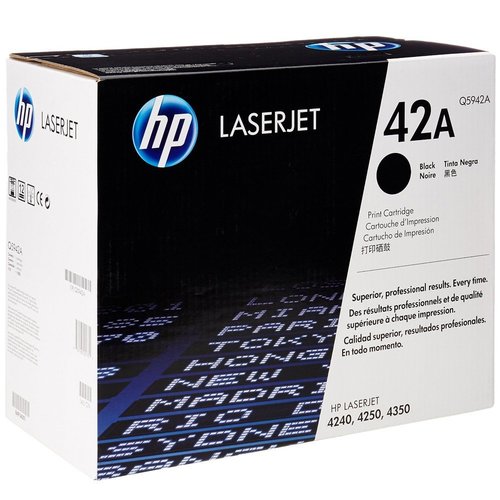
HP 42A Black Laserjet Toner Cartridge
13500 INR
Product Details:
- Height --
- Printer Type LaserJet
- Capacity Approximately 10,000 pages at 5% coverage
- Features Consistent, reliable, high-quality printing; easy to install and replace
- Power Source --
- Pattern --
- Outer Diameter --
- Click to View more
X
HP 42A Black Laserjet Toner Cartridge Price And Quantity
- 1 Piece
- 13500 INR
HP 42A Black Laserjet Toner Cartridge Product Specifications
- --
- --
- --
- HP
- Standard
- Black
- A4, Letter
- 1.42 kg (approximate)
- Up to 45 ppm supported by compatible printers
- Toner
- HP
- Q5942A (HP 42A)
- HP LaserJet 4250/4350 Series
- --
- Store in a cool, dry place
- --
- LaserJet
- Approximately 10,000 pages at 5% coverage
- Consistent, reliable, high-quality printing; easy to install and replace
- --
- --
- --
- --
- Laser
- -20 to 40°C
- Up to 10,000 pages at 5% coverage
- 391 x 193 x 300 mm (W x D x H)
- 24 months (unopened)
- 10 to 32.5°C
- Yes, via HP Planet Partners
- Original LaserJet Toner Cartridge
- 20 to 80% RH
HP 42A Black Laserjet Toner Cartridge Trade Information
- 2 Days
- All India
Product Description
Key Features
- Excellent results every time, guaranteed.
- Print ecosystem optimized for great results.
- Reliable, cost effective and improves productivity.
- HP Smart printing technology enables supplies status and usage information, shake-free cartridges, dynamic EP adjustments, and cartridge installation assurance.
- Easy to install and maintain.
Compatibility
- HP LaserJet 42402, 4250, 4350 Printer series
Technical Details
| Brand | HP |
| Colour | Black |
| Item Height | 33 Centimeters |
| Item Width | 20.3 Centimeters |
| Item Weight | 9.07 g |
| Product Dimensions | 39.7 x 20.3 x 33 cm |
| Item model number | Q5942A |
| Processor Count | 1 |
| Computer Memory Type | DRAM |
| Additional Drives | DVD |
| Graphics Card Interface | AGP |
| Wireless Type | 802.11b, 802.11a, 802.11g |
| Voltage | 240 Volts |
| U-Rack Size | 1 |
Exceptional Page Yield for Professional Offices
With a robust capacity of up to 10,000 pages at 5% coverage, the HP 42A Black LaserJet Toner Cartridge is tailored for businesses with high-volume printing needs. It maintains consistent output quality, reducing the frequency of replacements and operational interruptions, making it an optimal choice for busy office environments.
Quality and Compatibility You Can Trust
As an original HP toner cartridge, the 42A (Q5942A) is engineered for precise compatibility with HP LaserJet 4250 and 4350 series printers. It ensures crisp text and professional results with each print job, and is easy to install, providing a hassle-free printing experience while safeguarding your printer.
Sustainable and Reliable Printing Solution
Supporting sustainability, this toner can be recycled through HP Planet Partners, minimizing environmental impact. Its robust storage and operating ranges ensure reliable performance across different climates, while a 24-month unopened shelf life maximizes inventory flexibility for businesses.
FAQs of HP 42A Black Laserjet Toner Cartridge:
Q: How do I properly install the HP 42A Black LaserJet Toner Cartridge in my printer?
A: To install the HP 42A (Q5942A) cartridge, open your HP LaserJet 4250/4350 printers front cover, remove the old cartridge, and insert the HP 42A firmly until it clicks into place. Close the cover and follow any on-screen instructions if prompted.Q: What printing performance can I expect from the HP 42A toner cartridge?
A: The HP 42A cartridge is rated for up to 10,000 pages at 5% coverage, ensuring consistent, high-quality black prints suitable for documents, reports, and correspondence. Compatible printers can support printing speeds up to 45 pages per minute.Q: Where should I store an unopened HP 42A toner cartridge?
A: For optimal performance, store unopened cartridges in a cool, dry place, within a temperature range of -20 to 40C and humidity of 20 to 80% RH. This preserves quality and extends the shelf life up to 24 months.Q: What is the process for recycling used HP 42A toner cartridges?
A: Used HP 42A cartridges can be recycled through the HP Planet Partners program. Simply collect your empty cartridge and return it via HPs designated collection centers or authorized recycling partners for responsible processing.Q: When should I replace the HP 42A toner cartridge?
A: Replace the cartridge when your HP LaserJet printer displays a Low Toner or Replace Cartridge message, or when print quality diminishes, ensuring uninterrupted professional quality in your documents.Q: What are the benefits of using an original HP 42A toner cartridge over compatibles?
A: Original HP 42A cartridges ensure printer compatibility, reliable operation, consistent print quality, and fewer printer issues. They also offer easy recycling options and are manufactured to meet HPs environmental and quality standards.Tell us about your requirement

Price:
Quantity
Select Unit
- 50
- 100
- 200
- 250
- 500
- 1000+
Additional detail
Mobile number
Email

Other Products in 'Cartridges & Printers' category


"We are accepting local inquiries only for South India."

 Send Inquiry
Our Products
- Garbage Bins & Covers
- Paper shredder & lamination Machine
- Wipers
- Mop & Accessories
- Cleaning Cloths
- Boards
- Buckets
- Liquid Chemicals
- Cleaning Powder
- Brush
- Tissues
- Newspaper Stand
- Brooms & Dustpan
- Cups & Mugs
- Air fragrance & Dispenser
- Safety items
- Vacuum Cleaners
- Currency Counting And Shredding Machine
- Batteries
- Label Manager
- Projectors & Stands
- Foldable Table
- MONITOR ARM SOLUTIONS
- Monitor Stands
- Keyboard Drawers
- Computer Accessories
- Water Bottles
- Safety Equipments
- Projector & Projector Accessories
- Disposable Items
- Boards & Accessories
- Cleaning Chemicals
- Scrubbers
- Hand Wash Dispenser
- Hand Dryer Dispenser
- Tissue Dispenser
- Mat
- Water Bottle
- Cutlery
- Magazine Stands
- Ceramic Boards
- Ceramic Magnetic Boards
- Memory Cards & Pen Drives
- CD/DVD & Hard disk
- Stands
- Cartridges & Printers
- Stapler Pins & Machines
- Covers & Envelopes
- Files & Folders
- Permanent Marker&CD/DVD Markers
- Pens&Pencils
- Sketch Pens
- Correction Pens
- Calculator
- Packaging & Adhesive Materials
- Exam Pad
- Stapler Machines & Pins
- Photo Glossy Paper
- Sketch Pens & Crayons
- Photo Glossy & Carbon Paper
- Erasers & Sharpener
- Office Needs
- Cutters & Scissors
- Chalk & Dusters
- Notebooks & Registers
- Lables
- Labels
- Other Items

No.29/15, Subbedar Hussain St, Padupakkam, Royapettah, Chennai - 600014, Tamil Nadu, India

Mr Ajit Shanaz
(Marketing Executive)
Mobile :07971191065
 Send Inquiry
 Send SMS
Developed and Managed by Infocom Network Private Limited.
