
Call us now :07971191065
 Send Inquiry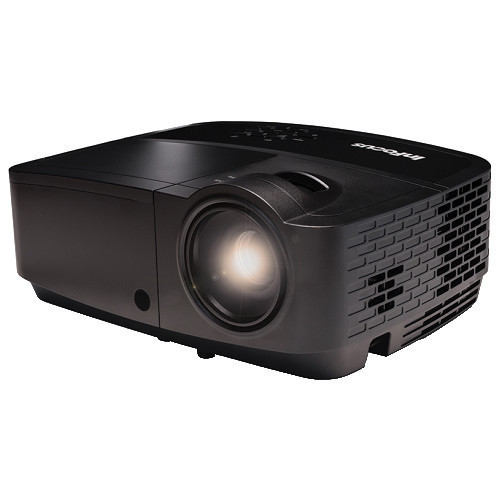
Infocus IN 2241 Projector
Product Details:
- Model No IN2241
- Product Type Shredder
- Material Plastic, Metal
- Usage Presentation, Movies, Training
- Function Projection of multimedia content
- Size Approx. 314 x 224 x 87 mm
- Weight 2.6 kg
- Click to View more
X
Infocus IN 2241 Projector Price And Quantity
Infocus IN 2241 Projector Product Specifications
- Windows, Mac OS, Linux
- Approx. 314 x 224 x 87 mm
- 2.6 kg
- Long Lamp Life, Easy to Use, Versatile Connectivity
- VGA, HDMI
- Presentation, Movies, Training
- Projection of multimedia content
- Shredder
- Plastic, Metal
- Business, Education, Home Theater
- IN2241
- 3D Ready, High Brightness, Keystone Correction
- 260W (typical), <0.5W (standby)
- HDMI, VGA, Composite Video, S-Video, Audio In
- VGA, Audio Out
- XGA (1024 x 768)
- 480i/p, 576i/p, 720p, 1080i/p
- 4:3 (native), 16:9 (compatible)
- 1.94 - 2.16:1
- Included
- 3500 Lumens
- Up to 15,000 Hours (Dynamic Mode)
- DLP
- 27 dB (Eco mode)
- 17,000:1
- Black
- +/- 40 Vertical
- Integrated 2W Mono
- Manual Focus
Infocus IN 2241 Projector Trade Information
- 2 Days
- Asia
- South India
Product Description
The InFocus IN224 SVGA projector has high brightness for larger or brighter meeting rooms, connectivity for digital devices, and low price to fit tight budgets.
Key Features
- SVGA (800 x 600) resolution
- HDMI 1.4 input
- 3800 lumens
- Contrast ratio: 17000:1
- Compact and lightweight
Specifications
| Resolution Native | SVGA (800 x 600) |
| Display Technology | DLP |
| Speakers | Mono 2W x 1 |
| Lamp Brightness | 3,800 lumens |
| Lamp Life Low Power | 6,000 hours |
| Lamp Life Bright Mode | 5,000 hours |
| Contrast Ratio | 17,000:1 |
| Number of Colors | 16.7 million |
| Aspect Ratio | 4:3 |
| Keystone Correction | ± 40ºV |
| Connectors Inputs | HDMI 1.4 (rear), Composite video, S-video, 3.5mm PC audio, VGA x2 |
| Connectors Outputs | 3.5mm audio output, VGA |
| Audible Noise | < 32 dBA at 0°F / -17.8°C |
| Audible Noise Eco Mode | < 29 dBA at 0°F / -17.8°C |
Bright and Flexible Projection
With a high brightness of 3500 lumens and a robust contrast ratio of 17,000:1, the IN 2241 projector ensures clear, sharp visuals even in well-lit rooms. Its throw ratio and manual focus feature allow users to adapt to different room sizes and projection distances, making it an ideal choice for classrooms, offices, and home theaters.
Comprehensive Connectivity
The projectors diverse range of input and output ports including HDMI, VGA, composite video, S-video, and audio connections allows seamless integration with PCs, laptops, DVD players, and other multimedia devices. Compatible with Windows, Mac OS, and Linux, it supports video formats up to 1080p for versatile presentation and entertainment needs.
Long-lasting and Easy to Maintain
Featuring a lamp life of up to 15,000 hours (Dynamic Mode), the IN 2241 minimizes maintenance and replacement costs. The projectors lightweight design (2.6 kg), remote control, and intuitive setup ensure convenient installation and operation, delivering reliable performance for years.
FAQs of Infocus IN 2241 Projector:
Q: How do I connect the Infocus IN 2241 Projector to my laptop or PC?
A: You can connect your laptop or PC to the Infocus IN 2241 Projector using either the HDMI or VGA ports. Simply use the appropriate cable, select the correct input source on the projector, and adjust your computers display settings if needed. The projector supports Windows, Mac OS, and Linux systems.Q: What is the recommended usage environment for the IN 2241 projector?
A: The IN 2241 projector is designed for a range of applications including business presentations, educational training, and home theater. Its high brightness and contrast make it suitable for well-lit rooms, classrooms, meeting spaces, and home settings.Q: When should I consider replacing the projector lamp?
A: Under typical usage in Dynamic Mode, the lamp lasts up to 15,000 hours. You should consider replacing the lamp when the image becomes noticeably dim or after reaching the estimated lamp life. The projector will normally display a warning when its time to replace the lamp.Q: Where can I install the Infocus IN 2241 projector for optimal performance?
A: Install the projector in a location that allows proper ventilation, a stable surface, and enough distance from the projection screen for the desired image size. The throw ratio (1.94 - 2.16:1) helps determine placement based on available space and screen dimensions.Q: What process should I follow to activate Keystone Correction?
A: Use the remote control or projector menu to access keystone correction settings. Adjust the vertical keystone by up to +/- 40 to correct trapezoidal distortion, ensuring a properly aligned image even if the projector is not perfectly centered with the screen.Q: How does the projector benefit users in educational and business contexts?
A: Teachers and professionals benefit from the IN 2241s high brightness, sharp resolution, and long lamp life, providing reliable visual support for presentations, lessons, and training sessions. Its versatile connectivity makes it compatible with a wide range of devices and formats.Q: Is the Infocus IN 2241 projector compatible with 3D content?
A: Yes, the IN 2241 is 3D Ready when paired with compatible 3D sources and glasses, allowing you to project immersive 3D multimedia for enhanced learning and entertainment experiences.Tell us about your requirement

Price:
Quantity
Select Unit
- 50
- 100
- 200
- 250
- 500
- 1000+
Additional detail
Mobile number
Email

Other Products in 'Projector & Projector Accessories' category

"We are accepting local inquiries only for South India."

 Send Inquiry
Our Products
- Garbage Bins & Covers
- Paper shredder & lamination Machine
- Wipers
- Mop & Accessories
- Cleaning Cloths
- Boards
- Buckets
- Liquid Chemicals
- Cleaning Powder
- Brush
- Tissues
- Newspaper Stand
- Brooms & Dustpan
- Cups & Mugs
- Air fragrance & Dispenser
- Safety items
- Vacuum Cleaners
- Currency Counting And Shredding Machine
- Batteries
- Label Manager
- Projectors & Stands
- Foldable Table
- MONITOR ARM SOLUTIONS
- Monitor Stands
- Keyboard Drawers
- Computer Accessories
- Water Bottles
- Safety Equipments
- Projector & Projector Accessories
- Disposable Items
- Boards & Accessories
- Cleaning Chemicals
- Scrubbers
- Hand Wash Dispenser
- Hand Dryer Dispenser
- Tissue Dispenser
- Mat
- Water Bottle
- Cutlery
- Magazine Stands
- Ceramic Boards
- Ceramic Magnetic Boards
- Memory Cards & Pen Drives
- CD/DVD & Hard disk
- Stands
- Cartridges & Printers
- Stapler Pins & Machines
- Covers & Envelopes
- Files & Folders
- Permanent Marker&CD/DVD Markers
- Pens&Pencils
- Sketch Pens
- Correction Pens
- Calculator
- Packaging & Adhesive Materials
- Exam Pad
- Stapler Machines & Pins
- Photo Glossy Paper
- Sketch Pens & Crayons
- Photo Glossy & Carbon Paper
- Erasers & Sharpener
- Office Needs
- Cutters & Scissors
- Chalk & Dusters
- Notebooks & Registers
- Lables
- Labels
- Other Items

No.29/15, Subbedar Hussain St, Padupakkam, Royapettah, Chennai - 600014, Tamil Nadu, India

Mr Ajit Shanaz
(Marketing Executive)
Mobile :07971191065
 Send Inquiry
 Send SMS
Developed and Managed by Infocom Network Private Limited.
