
Call us now :07971191065
 Send Inquiry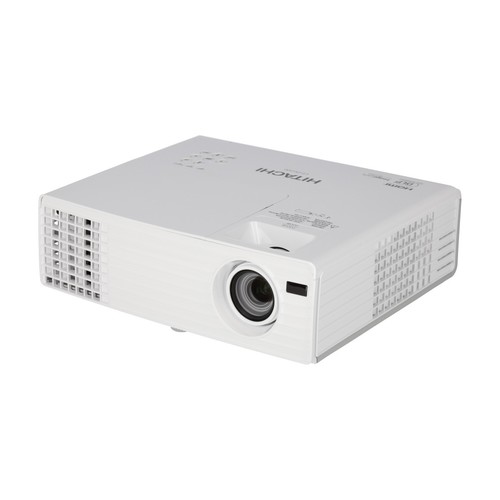
Hitachi DLP Projector CP-DH300
76100 INR
Product Details:
- Model No CP-DH300
- Product Type Projector
- Material Plastic/Metal
- Usage Office, Classroom, Conference
- Function Projection of multimedia content
- Size 350 x 85 x 303 mm
- Weight 3.9 kg
- Click to View more
X
Hitachi DLP Projector CP-DH300 Price And Quantity
- 1 Piece
- 76100 INR
Hitachi DLP Projector CP-DH300 Product Specifications
- Plastic/Metal
- Projector
- CP-DH300
- Short Throw Projection
- High Brightness, Low Maintenance
- Business & Education
- 350 x 85 x 303 mm
- Yes
- Windows, Mac OS
- Office, Classroom, Conference
- 3.9 kg
- Projection of multimedia content
- AC 100-240V, 50/60Hz
- 2000:1
- 16:9
- PAL, SECAM, NTSC
- Tabletop/Wall Mounted
- Up to 5000 Hours
- Manual
- <34 dB
- -20C to 60C
- DLP (Digital Light Processing)
- Full HD 1920 x 1080
- 3000 ANSI Lumens
- Audio Out, RS232C
- HDMI, VGA, USB Type-A, Audio In/Out
- Included
- Built-in 10W
- 0.7m to 1.3m
- White
- 0C to 40C
Hitachi DLP Projector CP-DH300 Trade Information
- 2 Days
- South India
Product Description
Details
| Sales Package: | Projector, Remote Control with Battery (HL02961), RGB Cable, Power Chord, User Manual (CD-ROM and Printed Sheet) |
| Model Name: | CP-DH300 |
| Part Number: | CP-DH300 |
| Color: | White |
| Maximum Brightness: | 3000 lm |
| Light Source: | UHP |
Impressive Visual Performance
The CP-DH300 features DLP technology, Full HD 1920 x 1080 resolution, and 3000 ANSI Lumens brightness. Its high contrast ratio and short projection distance ensure sharp images without distortion, making it an excellent choice for presentations or multimedia learning.
Versatile Connectivity and Usage
Equipped with HDMI, VGA, USB, and audio ports, the projector connects seamlessly to a range of devices. It suits various environments including offices, classrooms, and conference rooms. Its compatibility with Windows and Mac OS ensures flexibility for diverse user needs.
Low Maintenance and Efficient Operation
The projectors lamp offers up to 5000 hours of lifespan, while manual keystone correction and durable construction (plastic/metal) keep maintenance minimal. Its low noise output and built-in speaker deliver a distraction-free multimedia experience.
FAQs of Hitachi DLP Projector CP-DH300:
Q: How do I set up the Hitachi CP-DH300 projector for short throw projection?
A: Place the projector at a distance within 0.7 to 1.3 meters from the screen for optimal short throw performance. Use the manual keystone correction to ensure the image is properly aligned, and connect your source device via HDMI, VGA, or USB. Power on using the remote control.Q: What types of devices can I connect to the CP-DH300 projector?
A: You can connect laptops, desktops, media players, and other compatible devices via HDMI, VGA, or USB Type-A ports. Audio input/output connections support external speakers or sound systems. The projector works with devices running Windows or Mac OS.Q: When should the projector lamp be replaced, and how is lamp life monitored?
A: The CP-DH300 projector lamp typically lasts up to 5000 hours. Monitor lamp usage through the projectors on-screen menu, which indicates remaining lamp life. Replace the lamp when brightness diminishes or the system prompts a lamp warning.Q: Where can the Hitachi CP-DH300 projector be installed?
A: This projector supports both tabletop and wall-mounted installations, adapting to various room setups in offices, classrooms, or conference areas. Ensure there is sufficient space for ventilation and easy access to ports.Q: What is the process for keystone correction on the CP-DH300?
A: Keystone correction is performed manually. Use the adjustment controls on the projector body or via remote to align the projected image, especially if the projector is positioned off-center relative to the screen.Q: How is multimedia content projected and what video formats are supported?
A: Connect your multimedia device to the projector and select the appropriate input source. The CP-DH300 supports major video formats including PAL, SECAM, and NTSC, ensuring smooth playback for various types of content.Q: What are the benefits of using the CP-DH300 projector in business or education settings?
A: Key benefits include high brightness for vivid images, short throw projection preventing shadow interference, versatile connectivity, low maintenance, built-in speakers, and quiet operation, all contributing to enhanced communication and learning experiences.Tell us about your requirement

Price:
Quantity
Select Unit
- 50
- 100
- 200
- 250
- 500
- 1000+
Additional detail
Mobile number
Email

Other Products in 'Projector & Projector Accessories' category

"We are accepting local inquiries only for South India."

 Send Inquiry
Our Products
- Garbage Bins & Covers
- Paper shredder & lamination Machine
- Wipers
- Mop & Accessories
- Cleaning Cloths
- Boards
- Buckets
- Liquid Chemicals
- Cleaning Powder
- Brush
- Tissues
- Newspaper Stand
- Brooms & Dustpan
- Cups & Mugs
- Air fragrance & Dispenser
- Safety items
- Vacuum Cleaners
- Currency Counting And Shredding Machine
- Batteries
- Label Manager
- Projectors & Stands
- Foldable Table
- MONITOR ARM SOLUTIONS
- Monitor Stands
- Keyboard Drawers
- Computer Accessories
- Water Bottles
- Safety Equipments
- Projector & Projector Accessories
- Disposable Items
- Boards & Accessories
- Cleaning Chemicals
- Scrubbers
- Hand Wash Dispenser
- Hand Dryer Dispenser
- Tissue Dispenser
- Mat
- Water Bottle
- Cutlery
- Magazine Stands
- Ceramic Boards
- Ceramic Magnetic Boards
- Memory Cards & Pen Drives
- CD/DVD & Hard disk
- Stands
- Cartridges & Printers
- Stapler Pins & Machines
- Covers & Envelopes
- Files & Folders
- Permanent Marker&CD/DVD Markers
- Pens&Pencils
- Sketch Pens
- Correction Pens
- Calculator
- Packaging & Adhesive Materials
- Exam Pad
- Stapler Machines & Pins
- Photo Glossy Paper
- Sketch Pens & Crayons
- Photo Glossy & Carbon Paper
- Erasers & Sharpener
- Office Needs
- Cutters & Scissors
- Chalk & Dusters
- Notebooks & Registers
- Lables
- Labels
- Other Items

No.29/15, Subbedar Hussain St, Padupakkam, Royapettah, Chennai - 600014, Tamil Nadu, India

Mr Ajit Shanaz
(Marketing Executive)
Mobile :07971191065
 Send Inquiry
 Send SMS
Developed and Managed by Infocom Network Private Limited.
