
Call us now :07971191065
 Send Inquiry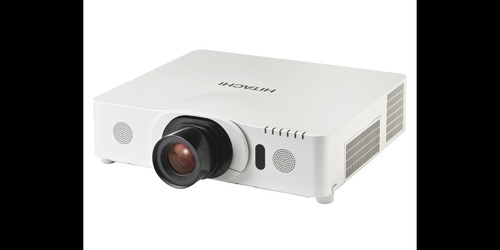
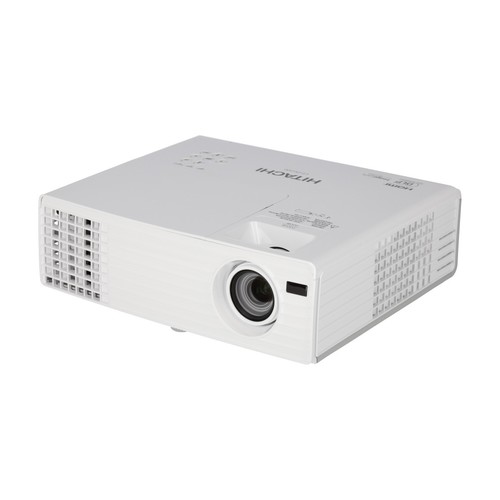
Hitachi CP-WX8265 Professional Series Projector
300800.00 INR
Product Details:
- Product Type Professional Projector
- Model No CP-WX8265
- Material High-grade plastic, metal composites
- Usage Indoor Large Venues, Corporate Events, Multimedia Presentations
- Function Projection of images, videos, and presentations
- Size 498mm x 155mm x 354mm
- Weight 8.5 kg
- Click to View more
X
Hitachi CP-WX8265 Professional Series Projector Price And Quantity
- 300800.00 INR
- 1 Piece
Hitachi CP-WX8265 Professional Series Projector Product Specifications
- High-grade plastic, metal composites
- Windows, macOS
- Supports projection up to 300 inches
- 498mm x 155mm x 354mm
- Projection of images, videos, and presentations
- Indoor Large Venues, Corporate Events, Multimedia Presentations
- HDMI, VGA, DVI-D, DisplayPort, USB Type A/B, LAN (RJ-45)
- Edge Blending, Perfect Fit, High Brightness, Long Lamp Life, Versatile Connectivity
- Professional, Education, Conference Rooms, Auditoriums
- Professional Projector
- 8.5 kg
- 6500 ANSI Lumens, Wide XGA Resolution, Advanced Networking
- CP-WX8265
- 38 dB (Normal), 31 dB (Eco mode)
- Ceiling, Tabletop, Rear Projection
- Power cable, Remote control, Lens cap, User manual
- Vertical & Horizontal
- 10-bit (1.07 billion colors)
- 0C-40C
- 1280 x 800 (WXGA)
- 3000:1
- AMX, Crestron, PJLink compatible
- 1.46 - 2.94
- Manual Vertical & Horizontal
- Up to 2500 hours (Normal mode), 4000 hours (Eco mode)
- AC 100-240V, 50/60 Hz
- Included
- 3LCD
- 16W Built-in Mono
- 6500 ANSI Lumens
- Monitor Out (VGA), Audio Out (Stereo Mini Jack)
- HDMI x2, DVI-D, VGA In x2, Composite Video, USB-A/B, LAN, RS-232C
Hitachi CP-WX8265 Professional Series Projector Trade Information
- 2 Days
- Asia
- South India
Product Description
Basic functions: Freeze,Magnifying, Blank, Auto adjustment, Auto signal search.
Picture adjustments: Aspect selection, Equalising digital gamma correction, 2-3 Pull Down for NTSC,Progressive scan, Noise reduction, Mirror Reverse Image, Up-side Down Image,Equalising colour temperature adjustment, Frame lock, Perfect Fit.
Digital keystone: Auto Vertical & Horizontal Keystone correction.
Advanced features: Audio pass through, Audio ports assign, Auto Eco Mode, Filter timer, Lens memory, My Button, My Memory, My Text, MyScreen,Overscan,PC-less presentation, Picture modes (normal, cinema, dynamic, blackboard, green board,white board, daytime, DICOM simulation), Resolution setting, Source naming(English), Template, Instant stack, 360 vertical tilt, Active iris, Eco mode(Normal, Eco), Mechanical shade, Picture by Picture/ Picture in Picture, Remote ID, Status monitor, Accentualizer technology, iOS Connectivity.
Exceptional Brightness and Image Quality
Delivering 6500 ANSI lumens with 3LCD technology, the CP-WX8265 ensures vivid, sharp images suitable for large venues or spaces with ambient light. Its 10-bit color processing allows for the reproduction of over a billion colors, rendering presentations and videos with high fidelity and remarkable detail.
Versatile Installation and Control
The projector offers flexible mounting options including ceiling, tabletop, and rear projection, accommodating various room layouts. Manual lens shift and both vertical and horizontal keystone correction simplify alignment. Advanced networking (AMX, Crestron, PJLink) enables remote management and monitoring, streamlining operations for IT departments.
Comprehensive Connectivity Options
Equipped with dual HDMI, DVI-D, two VGA inputs, composite video, USB, and LAN ports, the CP-WX8265 connects easily to a wide range of devices. Whether integrating with Windows, macOS, or AV systems in professional and educational settings, users enjoy easy, reliable connections for seamless content sharing.
FAQs of Hitachi CP-WX8265 Professional Series Projector:
Q: How can I set up the Hitachi CP-WX8265 projector for the best performance in a large venue?
A: For optimal results in large venues, mount the projector using ceiling or tabletop options as needed, and adjust the manual lens shift and keystone correction for precise image alignment. Utilize the high 6500 ANSI lumens brightness for rooms with ambient light, and connect via HDMI or LAN for reliable content delivery.Q: What connectivity options does the CP-WX8265 offer for different devices and platforms?
A: The projector features versatile input terminals, including dual HDMI, DVI-D, two VGA inputs, USB-A/B, and LAN, supporting Windows, macOS, and major AV equipment. This flexibility allows seamless integration with laptops, desktops, video sources, and network control systems.Q: When should I use Eco mode on the projector, and what are its benefits?
A: Eco mode is ideal for extending the lamps life up to 4000 hours and reducing noise to 31 dB, making it suitable for quieter environments or less demanding brightness needs. Using Eco mode helps lower maintenance costs and conserves energy without compromising viewing quality in controlled lighting.Q: Where can the projector be installed, and what projection configurations are possible?
A: The CP-WX8265 can be installed on the ceiling, placed on a table, or used for rear projection, offering flexibility for different spaces. These configurations suit auditoriums, conference rooms, and classrooms, ensuring optimal placement for your viewing surface and audience size.Q: What is the process for connecting the CP-WX8265 to a control network?
A: Connect the projector to your existing network via the LAN or RS-232C ports. It supports leading control protocols such as AMX, Crestron, and PJLink, enabling remote management, scheduling, and status monitoring through compatible network systems for efficient operation in large facilities.Q: How does the projector benefit professional and educational presentations?
A: With high brightness, wide resolution (WXGA), and features like edge blending and perfect fit, the CP-WX8265 delivers large, clear visuals for impactful presentations. Advanced networking and robust connectivity streamline setup, while long lamp life and low maintenance enhance reliability for frequent, high-demand usage.Tell us about your requirement

Price:
Quantity
Select Unit
- 50
- 100
- 200
- 250
- 500
- 1000+
Additional detail
Mobile number
Email

Other Products in 'Projector & Projector Accessories' category

"We are accepting local inquiries only for South India."

 Send Inquiry
Our Products
- Garbage Bins & Covers
- Paper shredder & lamination Machine
- Wipers
- Mop & Accessories
- Cleaning Cloths
- Boards
- Buckets
- Liquid Chemicals
- Cleaning Powder
- Brush
- Tissues
- Newspaper Stand
- Brooms & Dustpan
- Cups & Mugs
- Air fragrance & Dispenser
- Safety items
- Vacuum Cleaners
- Currency Counting And Shredding Machine
- Batteries
- Label Manager
- Projectors & Stands
- Foldable Table
- MONITOR ARM SOLUTIONS
- Monitor Stands
- Keyboard Drawers
- Computer Accessories
- Water Bottles
- Safety Equipments
- Projector & Projector Accessories
- Disposable Items
- Boards & Accessories
- Cleaning Chemicals
- Scrubbers
- Hand Wash Dispenser
- Hand Dryer Dispenser
- Tissue Dispenser
- Mat
- Water Bottle
- Cutlery
- Magazine Stands
- Ceramic Boards
- Ceramic Magnetic Boards
- Memory Cards & Pen Drives
- CD/DVD & Hard disk
- Stands
- Cartridges & Printers
- Stapler Pins & Machines
- Covers & Envelopes
- Files & Folders
- Permanent Marker&CD/DVD Markers
- Pens&Pencils
- Sketch Pens
- Correction Pens
- Calculator
- Packaging & Adhesive Materials
- Exam Pad
- Stapler Machines & Pins
- Photo Glossy Paper
- Sketch Pens & Crayons
- Photo Glossy & Carbon Paper
- Erasers & Sharpener
- Office Needs
- Cutters & Scissors
- Chalk & Dusters
- Notebooks & Registers
- Lables
- Labels
- Other Items

No.29/15, Subbedar Hussain St, Padupakkam, Royapettah, Chennai - 600014, Tamil Nadu, India

Mr Ajit Shanaz
(Marketing Executive)
Mobile :07971191065
 Send Inquiry
 Send SMS
Developed and Managed by Infocom Network Private Limited.
