
Call us now :07971191065
 Send Inquiry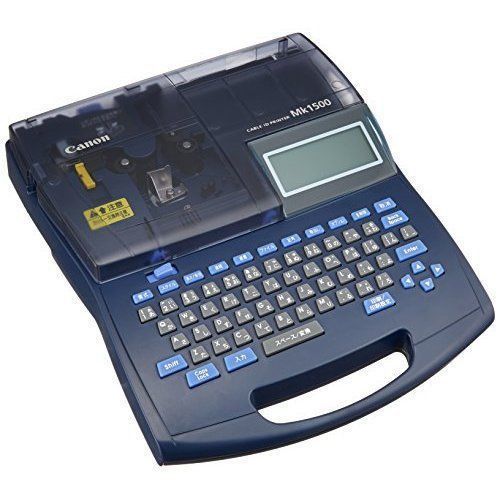
Canon MK2500 Ferrule Printer
Product Details:
- Print Technology Thermal Transfer
- Connectivity Type USB
- Year Built 2020
- For Use In Wire Marking, Cable Identification
- Ink Type Cassette Ink Ribbon
- Pattern Professional
- Storage Instructions Store in a dry, dust-free environment
- Click to View more
X
Canon MK2500 Ferrule Printer Price And Quantity
- 1 Piece
Canon MK2500 Ferrule Printer Product Specifications
- Black
- AC Adapter (100-240 V, 50/60 Hz)
- Approx. 20 mm/sec
- Store in a dry, dust-free environment
- Low
- Ready Stock
- Professional
- High Precision Printing, LCD Display, Standalone Operation, Easy Maintenance, PC Connectivity
- Cassette Ink Ribbon
- Approx. 2.4 kg
- Tape Size: 5 mm 9 mm
- Printer
- Ferrule Printer
- Compact
- USB
- Thermal Transfer
- 2020
- Canon
- Wire Marking, Cable Identification
- MK2500
- Wire identification, panel marking, industrial labeling
- PVC Tube, Heat Shrink Tube, Label Tape
- Multilingual support
- LCD with backlight
- QWERTY
- 15 to 35 C
- up to 100m per roll
- Up to 60 files
- Compatible with Canon ferrule creation software
Canon MK2500 Ferrule Printer Trade Information
- Within 2 days in local area Days
- All India
Product Description
Product Description- Canon MK2500 Ferrule Cable Id Printer
- High quality crisp and clear printing on variety of media like:
- PVC tubes
- Heat shrink tubes
- Self adhesive labels
- Marking strips
- Wrap around tapes
- Marker plates for terminal
- High Speed Printing (35pcs./Min.)
- Direct USB Interface (full speed) PC linkage
- Exclusive Ink ribbon Cassette of 100mtr. Length
- Consecutive / Serial Printing
- Compact designed Printer weighs only 2kgs., easy to carry to various job sites.
Advanced Labeling Technology
Harnessing the precision of thermal transfer technology, the Canon MK2500 ensures sharp and durable prints on various tube and tape types, including PVC and heat shrink. The high-speed printing function, coupled with a large ribbon capacity, makes it suitable for demanding industrial environments where efficiency matters.
User-Friendly Design and Operation
Designed for standalone use, the MK2500 features a backlit LCD display and a QWERTY keyboard for smooth, on-the-go operation. With multilingual support and an intuitive interface, users can quickly create, edit, and store up to 60 labeling files, simplifying repetitive tasks and improving workflow.
Versatile Applications and Connectivity
Ideal for wire marking, cable identification, and panel labeling, the printer comes with all necessary accessories and supports Canons specialized ferrule creation software through USB connectivity. Its ready stock availability in India ensures quick deployments for manufacturers, retailers, and traders.
FAQs of Canon MK2500 Ferrule Printer:
Q: How do I operate the Canon MK2500 Ferrule Printer as a standalone unit?
A: The MK2500 can be used without a PC by utilizing its built-in QWERTY keyboard and LCD backlit display. Simply power it on with the included AC adapter, insert your chosen tube or tape, select settings, and input text directly, allowing you to print labels on-site quickly and efficiently.Q: What applications is the Canon MK2500 Ferrule Printer best suited for?
A: This printer is ideal for wire and cable identification, panel marking, and other industrial labeling needs. Its compatibility with PVC tubes, heat shrink tubes, and label tapes makes it highly versatile for professional electrical, manufacturing, and maintenance environments.Q: When should I perform maintenance on the MK2500 and what does it involve?
A: Routine maintenance is recommended as outlined in the user manual or when print quality degrades. Maintenance typically involves using the cleaning set provided to clear dust and residue from the print head and other components, helping extend printer longevity and maintain high print standards.Q: Where can the Canon MK2500 be installed and operated safely?
A: For optimal performance, install the MK2500 in a dry, dust-free environment with temperatures between 15 and 35 C. Its compact size and low noise levels make it suitable for workshops, offices, and industrial sites.Q: What process should I follow to print labels using Canon software?
A: To use the Canon ferrule creation software, connect the printer to your PC via USB. Launch the software, design your labels as required, and transfer the data to the printer for immediate production. This method streamlines batch label creation and improves labeling accuracy.Q: How does the Canon MK2500 benefit my labeling workflow?
A: The MK2500 enhances productivity by enabling fast, high-precision printing and supporting storage of up to 60 labeling files for quick recall. Its compatibility with multiple tube and tape types and standalone operation further optimize efficiency in complex labeling tasks.Tell us about your requirement

Price:
Quantity
Select Unit
- 50
- 100
- 200
- 250
- 500
- 1000+
Additional detail
Mobile number
Email

Other Products in 'Cartridges & Printers' category

"We are accepting local inquiries only for South India."

 Send Inquiry
Our Products
- Garbage Bins & Covers
- Paper shredder & lamination Machine
- Wipers
- Mop & Accessories
- Cleaning Cloths
- Boards
- Buckets
- Liquid Chemicals
- Cleaning Powder
- Brush
- Tissues
- Newspaper Stand
- Brooms & Dustpan
- Cups & Mugs
- Air fragrance & Dispenser
- Safety items
- Vacuum Cleaners
- Currency Counting And Shredding Machine
- Batteries
- Label Manager
- Projectors & Stands
- Foldable Table
- MONITOR ARM SOLUTIONS
- Monitor Stands
- Keyboard Drawers
- Computer Accessories
- Water Bottles
- Safety Equipments
- Projector & Projector Accessories
- Disposable Items
- Boards & Accessories
- Cleaning Chemicals
- Scrubbers
- Hand Wash Dispenser
- Hand Dryer Dispenser
- Tissue Dispenser
- Mat
- Water Bottle
- Cutlery
- Magazine Stands
- Ceramic Boards
- Ceramic Magnetic Boards
- Memory Cards & Pen Drives
- CD/DVD & Hard disk
- Stands
- Cartridges & Printers
- Stapler Pins & Machines
- Covers & Envelopes
- Files & Folders
- Permanent Marker&CD/DVD Markers
- Pens&Pencils
- Sketch Pens
- Correction Pens
- Calculator
- Packaging & Adhesive Materials
- Exam Pad
- Stapler Machines & Pins
- Photo Glossy Paper
- Sketch Pens & Crayons
- Photo Glossy & Carbon Paper
- Erasers & Sharpener
- Office Needs
- Cutters & Scissors
- Chalk & Dusters
- Notebooks & Registers
- Lables
- Labels
- Other Items

No.29/15, Subbedar Hussain St, Padupakkam, Royapettah, Chennai - 600014, Tamil Nadu, India

Mr Ajit Shanaz
(Marketing Executive)
Mobile :07971191065
 Send Inquiry
 Send SMS
Developed and Managed by Infocom Network Private Limited.
