
Call us now :07971191065
 Send Inquiry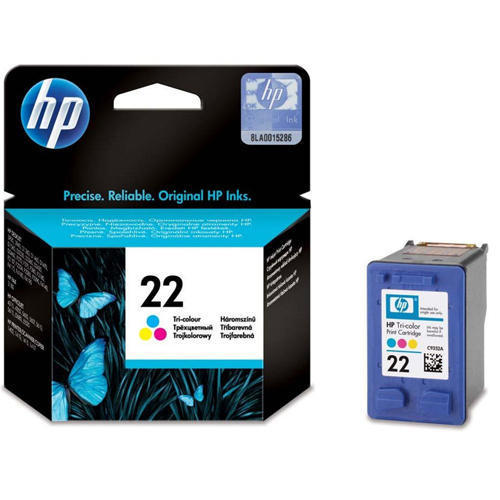
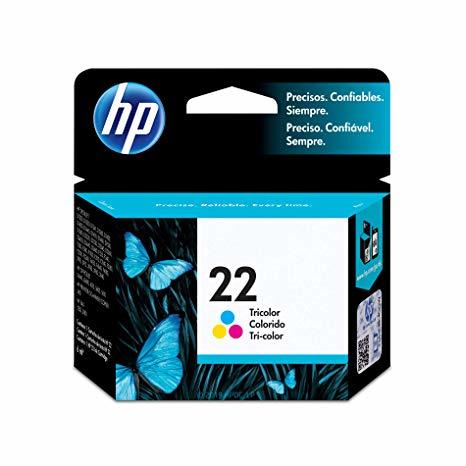
HP 22 Tri-Color Inkjet Print Cartridge
1800 INR
Product Details:
- Weight 38 g (approx.)
- Paper Size All Supported Sizes
- Printer Type Inkjet Printers
- Height 36 mm (approx.)
- Pattern Standard
- Capacity 5 ml
- Lead Time Ready Stock
- Click to View more
X
HP 22 Tri-Color Inkjet Print Cartridge Price And Quantity
- 1 Piece
- 1800 INR
HP 22 Tri-Color Inkjet Print Cartridge Product Specifications
- HP 22
- Depends on printer model
- Standard
- Cartridges
- Inkjet
- HP
- Tri-Color (Cyan, Magenta, Yellow)
- High-quality, Vivid Color, Quick-drying Ink
- Dye-based
- Store in cool, dry place
- Inkjet Printers
- 36 mm (approx.)
- 38 g (approx.)
- All Supported Sizes
- HP Deskjet, HP PSC, HP Officejet, HP Photosmart printers
- Standard
- 5 ml
- Ready Stock
- Original
- 115 x 111 x 36 mm
- 5 to 95% RH
- Approximately 165 pages
- 18 months from manufacturing date
- 15 to 32°C
HP 22 Tri-Color Inkjet Print Cartridge Trade Information
- 2 Days
- All India
Product Description
Spotlight your creativity and personalise every document with the HP 22 Tri-Color Inkjet Print Cartridge. Engineered for HP Inkjet printers, this top-ranking original cartridge features vivid cyan, magenta, and yellow dye-based ink for heroic, high-quality prints across all supported paper sizes. With a standard 5 ml capacity and an approximate yield of 165 pages, find reliable performance and quick-drying color every time. Its redoubtable design ensures consistent results within a broad operating range, making it the cartridge of choice for demanding environments. Stock ready for instant supply across India.
Versatile Media and Application Areas
HP 22 Tri-Color Inkjet Print Cartridge excels across diverse application mediafrom glossy photo paper to plain office sheets. Its vivid color output suits business documents, student projects, and vibrant photographs, serving offices, schools, and home users alike. Competitive advantages include reliable page yield, quick-drying ink, and compatibility with a wide range of HP Deskjet, PSC, Officejet, and Photosmart printers, making it a preferred choice for quality and flexibility.
Supply Ability and Export Markets
With stock ready for fast outlay and distribution, the HP 22 Tri-Color cartridge meets immediate demand with ease. Estimate your requirements confidently, as ample supply ensures business continuity and minimized downtime. Main export markets include Asia and worldwide regions, catering to manufacturers, retailers, suppliers, and traders. Sample availability further supports decision-making, letting customers assess product suitability before committing to bulk purchases.
Versatile Media and Application Areas
HP 22 Tri-Color Inkjet Print Cartridge excels across diverse application mediafrom glossy photo paper to plain office sheets. Its vivid color output suits business documents, student projects, and vibrant photographs, serving offices, schools, and home users alike. Competitive advantages include reliable page yield, quick-drying ink, and compatibility with a wide range of HP Deskjet, PSC, Officejet, and Photosmart printers, making it a preferred choice for quality and flexibility.
Supply Ability and Export Markets
With stock ready for fast outlay and distribution, the HP 22 Tri-Color cartridge meets immediate demand with ease. Estimate your requirements confidently, as ample supply ensures business continuity and minimized downtime. Main export markets include Asia and worldwide regions, catering to manufacturers, retailers, suppliers, and traders. Sample availability further supports decision-making, letting customers assess product suitability before committing to bulk purchases.
FAQs of HP 22 Tri-Color Inkjet Print Cartridge:
Q: How do I install the HP 22 Tri-Color Inkjet Print Cartridge in my printer?
A: To install, open your printers cartridge access door, remove the old cartridge, unseal the new HP 22 Tri-Color cartridge, and insert it in the designated slot, ensuring it clicks into place. Close the printer door and run a test print if prompted.Q: What printers are compatible with the HP 22 Tri-Color Inkjet Print Cartridge?
A: This cartridge works with HP Deskjet, HP PSC, HP Officejet, and HP Photosmart inkjet printers. Always check your printers user manual for compatibility before purchase.Q: When should I replace the HP 22 Tri-Color cartridge?
A: Replace the cartridge when you notice faded colors, poor print quality, or when your printer indicates that ink levels are low. Ideally, keep a spare ready to avoid workflow interruptions.Q: Where should I store HP 22 Tri-Color cartridges before use?
A: Store cartridges in a cool, dry location, away from direct sunlight, within an ambient temperature range of 1532C and humidity between 595% RH to maintain ink longevity and performance.Q: What is the benefit of using the original HP 22 Tri-Color cartridge?
A: Using the original cartridge assures high-quality, vivid color prints, since it is specifically engineered for HP printers. It guarantees optimal performance, reliable page yield, and reduces the risk of printer damage.Q: Is sample testing available for the HP 22 Tri-Color cartridge before bulk purchasing?
A: Yes, samples are available for testing, enabling buyers to evaluate cartridge performance and suitability before placing larger orders.Tell us about your requirement

Price:
Quantity
Select Unit
- 50
- 100
- 200
- 250
- 500
- 1000+
Additional detail
Mobile number
Email

Other Products in 'Cartridges & Printers' category
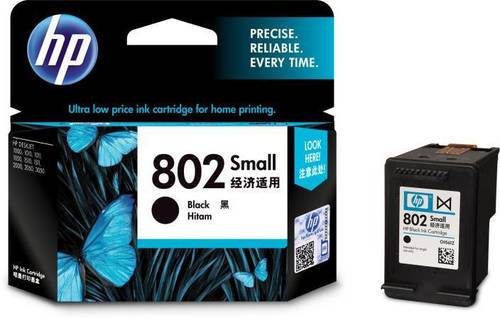

"We are accepting local inquiries only for South India."

 Send Inquiry
Our Products
- Garbage Bins & Covers
- Paper shredder & lamination Machine
- Wipers
- Mop & Accessories
- Cleaning Cloths
- Boards
- Buckets
- Liquid Chemicals
- Cleaning Powder
- Brush
- Tissues
- Newspaper Stand
- Brooms & Dustpan
- Cups & Mugs
- Air fragrance & Dispenser
- Safety items
- Vacuum Cleaners
- Currency Counting And Shredding Machine
- Batteries
- Label Manager
- Projectors & Stands
- Foldable Table
- MONITOR ARM SOLUTIONS
- Monitor Stands
- Keyboard Drawers
- Computer Accessories
- Water Bottles
- Safety Equipments
- Projector & Projector Accessories
- Disposable Items
- Boards & Accessories
- Cleaning Chemicals
- Scrubbers
- Hand Wash Dispenser
- Hand Dryer Dispenser
- Tissue Dispenser
- Mat
- Water Bottle
- Cutlery
- Magazine Stands
- Ceramic Boards
- Ceramic Magnetic Boards
- Memory Cards & Pen Drives
- CD/DVD & Hard disk
- Stands
- Cartridges & Printers
- Stapler Pins & Machines
- Covers & Envelopes
- Files & Folders
- Permanent Marker&CD/DVD Markers
- Pens&Pencils
- Sketch Pens
- Correction Pens
- Calculator
- Packaging & Adhesive Materials
- Exam Pad
- Stapler Machines & Pins
- Photo Glossy Paper
- Sketch Pens & Crayons
- Photo Glossy & Carbon Paper
- Erasers & Sharpener
- Office Needs
- Cutters & Scissors
- Chalk & Dusters
- Notebooks & Registers
- Lables
- Labels
- Other Items

No.29/15, Subbedar Hussain St, Padupakkam, Royapettah, Chennai - 600014, Tamil Nadu, India

Mr Ajit Shanaz
(Marketing Executive)
Mobile :07971191065
 Send Inquiry
 Send SMS
Developed and Managed by Infocom Network Private Limited.
