
Call us now :07971191065
 Send Inquiry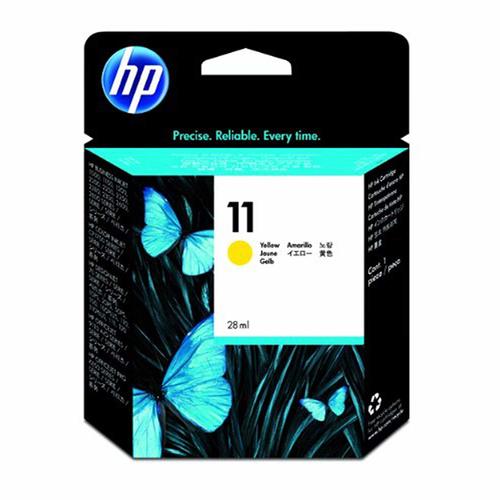
HP C4838A No 11 Ink Cartridge (Yellow)
3450 INR
Product Details:
- Color Yellow
- Compatible Brand HP
- Model No C4838A / No. 11
- Weight 60 g
- Lead Time Ready stock / Ships in 1-2 days
- Size Standard
- For Use In HP Business Inkjet, HP DesignJet, HP OfficeJet Pro, HP Color Copier Series
- Click to View more
X
HP C4838A No 11 Ink Cartridge (Yellow) Price And Quantity
- 3450 INR
- 1 Piece
HP C4838A No 11 Ink Cartridge (Yellow) Product Specifications
- Yellow
- HP
- C4838A / No. 11
- HP Business Inkjet, HP DesignJet, HP OfficeJet Pro, HP Color Copier Series
- Original
- 60 g
- Standard
- Ready stock / Ships in 1-2 days
- Inkjet
- Dye-based ink
- Cartridges
- 28 ml
- 113 mm
- High page yield, consistent print quality, easy installation
- Inkjet Printer
- Store in a cool, dry place
- Approx. 1,750 pages at 5% coverage
- 5 to 40°C
- Individual ink cartridge
- 5 to 95% RH
- 24 months from manufacturing
HP C4838A No 11 Ink Cartridge (Yellow) Trade Information
- 2 Days
- Asia
- All India
Product Description
- Color(s) of print cartridges: Yellow
- Ink drop: 4 pl
- Ink types: Dye-based
- Page yield (colour) ~2,550 pages
Key Features
- Genuine HP-formulated dye-based inks for brightest possible colours
- Works as a modular system with HP 10 black Ink Cartridge and HP 11 Printheads
- Built-in smart chip for outstanding print quality without guesswork
- Micro-tiny ink drops, nearly invisible to human eyes, produce smooth, sharp images
- New ink printing system enables faster dry time and improves smudge-resistance
Compatibility
- HP Officejet 9110, 9120, 9130 All-in-Ones
- HP Officejet Pro K850 Printer series
- HP Business Inkjet cp1700, 1000, 1100, 1200, 2200, 2230, 2250, 2280, 2300, 2600, 2800 Printer series Refer to section on Designjet for Compatibility
Consistent High-Quality Prints
Experience professional color accuracy with the HP C4838A No 11 Yellow Ink Cartridge, delivering reliable and vibrant print results for numerous business applications. Its high yield and dye-based ink provide sharp graphics and true yellow colors across a variety of documents.
Easy Installation and Compatibility
This cartridge is engineered for seamless compatibility with multiple HP printer models, including the Business Inkjet, DesignJet, OfficeJet Pro, and Color Copier Series. Installation is straightforward, making cartridge replacement quick and hassle-free for users.
Long Shelf Life and Simple Storage
You can store the HP C4838A No 11 cartridge for up to 24 months from manufacturing if kept in a cool, dry place. Its robust design tolerates a wide temperature and humidity range in non-operating conditions, ensuring long-term reliability.
FAQs of HP C4838A No 11 Ink Cartridge (Yellow):
Q: How do I install the HP C4838A No 11 Yellow Ink Cartridge in my printer?
A: Begin by opening your printers access panel, then gently remove the old cartridge. Take the new HP C4838A No 11 cartridge from its packaging, align it with the slot, and insert it until it clicks securely in place. Always follow the instructions specific to your HP printer model.Q: What printers are compatible with the HP C4838A No 11 Yellow Ink Cartridge?
A: This cartridge is designed for use in HP Business Inkjet, HP DesignJet, HP OfficeJet Pro, and HP Color Copier Series inkjet printers. Confirming your models compatibility ensures optimal performance and print quality.Q: When should I replace the HP C4838A No 11 Yellow Ink Cartridge?
A: Replace the cartridge when your printer notifies you of low or depleted yellow ink, or if print quality begins to fade or show streaks. The cartridge typically yields around 1,750 pages at 5% coverage before needing replacement.Q: Where should I store unused HP C4838A No 11 cartridges?
A: Store unused cartridges in a cool, dry environment, away from direct sunlight and extreme temperatures. Following these storage instructions ensures the cartridge maintains its quality up to its 24-month shelf life.Q: What are the benefits of using an original HP C4838A No 11 Yellow Ink Cartridge?
A: Using a genuine HP cartridge guarantees consistent print results, vibrant yellow colors, high page yield, and reliable compatibility with supported HP printers. It also helps prevent potential printer issues caused by non-original inks.Q: How does operating and storage temperature affect the cartridge?
A: The cartridge operates best within 5 to 40C. For storage, ensure humidity stays within 5 to 95% RH and keep the cartridge in a cool, dry place to avoid ink degradation and ensure longevity.Tell us about your requirement

Price:
Quantity
Select Unit
- 50
- 100
- 200
- 250
- 500
- 1000+
Additional detail
Mobile number
Email

Other Products in 'Cartridges & Printers' category

"We are accepting local inquiries only for South India."

 Send Inquiry
Our Products
- Garbage Bins & Covers
- Paper shredder & lamination Machine
- Wipers
- Mop & Accessories
- Cleaning Cloths
- Boards
- Buckets
- Liquid Chemicals
- Cleaning Powder
- Brush
- Tissues
- Newspaper Stand
- Brooms & Dustpan
- Cups & Mugs
- Air fragrance & Dispenser
- Safety items
- Vacuum Cleaners
- Currency Counting And Shredding Machine
- Batteries
- Label Manager
- Projectors & Stands
- Foldable Table
- MONITOR ARM SOLUTIONS
- Monitor Stands
- Keyboard Drawers
- Computer Accessories
- Water Bottles
- Safety Equipments
- Projector & Projector Accessories
- Disposable Items
- Boards & Accessories
- Cleaning Chemicals
- Scrubbers
- Hand Wash Dispenser
- Hand Dryer Dispenser
- Tissue Dispenser
- Mat
- Water Bottle
- Cutlery
- Magazine Stands
- Ceramic Boards
- Ceramic Magnetic Boards
- Memory Cards & Pen Drives
- CD/DVD & Hard disk
- Stands
- Cartridges & Printers
- Stapler Pins & Machines
- Covers & Envelopes
- Files & Folders
- Permanent Marker&CD/DVD Markers
- Pens&Pencils
- Sketch Pens
- Correction Pens
- Calculator
- Packaging & Adhesive Materials
- Exam Pad
- Stapler Machines & Pins
- Photo Glossy Paper
- Sketch Pens & Crayons
- Photo Glossy & Carbon Paper
- Erasers & Sharpener
- Office Needs
- Cutters & Scissors
- Chalk & Dusters
- Notebooks & Registers
- Lables
- Labels
- Other Items

No.29/15, Subbedar Hussain St, Padupakkam, Royapettah, Chennai - 600014, Tamil Nadu, India

Mr Ajit Shanaz
(Marketing Executive)
Mobile :07971191065
 Send Inquiry
 Send SMS
Developed and Managed by Infocom Network Private Limited.
