
Call us now :07971191065
 Send Inquiry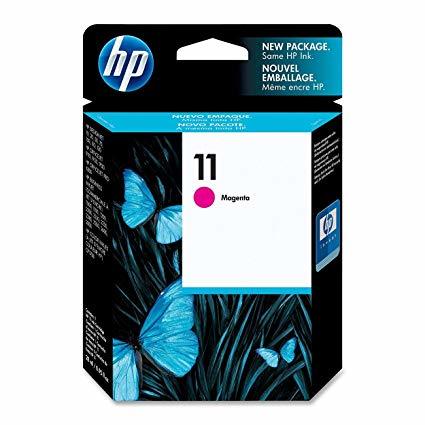
HP C4836A No 11 Cartridge Magenta
Product Details:
- Storage Instructions Store between 1535C, keep out of direct sunlight, keep sealed until use
- Print Technology Inkjet
- Capacity 28 ml
- Compatible Brand HP
- Weight Approx. 100 g (with packaging)
- Printer Type Inkjet Printers
- For Use In HP Business Inkjet 1200, 2200, 2230, 2250, 2280, HP Color Inkjet cp1700, HP Designjet 70, 100, 110, 120, 500, 800, plus compatible printers
- Click to View more
X
HP C4836A No 11 Cartridge Magenta Price And Quantity
- 1 , , Piece
HP C4836A No 11 Cartridge Magenta Product Specifications
- Standard
- Magenta
- C4836A
- Pigment-based
- Consistent, reliable printing; High-quality magenta color; Easy to install
- Ready Stock
- Cartridges
- HP Business Inkjet 1200, 2200, 2230, 2250, 2280, HP Color Inkjet cp1700, HP Designjet 70, 100, 110, 120, 500, 800, plus compatible printers
- Inkjet Printers
- Approx. 100 g (with packaging)
- HP
- 28 ml
- Inkjet
- Store between 1535C, keep out of direct sunlight, keep sealed until use
- Approx. 140 x 110 x 25 mm
- No
- 15C to 35C
- C4836A
- 18-24 months
- Up to 2,350 pages at 5% coverage
- -40C to 60C
- Yes (check with local recycling guidelines)
HP C4836A No 11 Cartridge Magenta Trade Information
- 2 Days
- All India
Product Description
- Color(s) of print cartridges: Magenta
- Ink drop: 4 pl
- Ink types: Dye-based
- Page yield (colour): ~2000 pages
HP 11 Magenta Ink Cartridge C4837A
Key Features
- Interactive system technology in HP 18 Officejet Ink Cartridges and HP Printer make automatic and continuous adjustments to optimise print quality
- Lower overall cost of printing with individually replaceable ink cartridges and reliable operation
- HP smart printing technology offers easy supplies replacement and HP Sure Supply offers convenient on-line ordering
Compatibility
- HP Officejet Pro K550, K550dtn, K5300, K5400dn, K5400dtn, K8600, K8600dn Printers
- HP Officejet Pro L7380, L7580, L7590 All-in-Ones
Optimal Performance and Quality
HPs C4836A No 11 cartridge delivers dependable, high-quality magenta prints thanks to its pigment-based ink formulation. Its excellent reliability ensures sharp, vivid colors on various documents, maintaining professional standards for business or creative projects.
Wide Compatibility and Easy Installation
This cartridge is engineered for seamless integration with a wide array of HP inkjet printers, including Business Inkjet and Designjet series. Its user-friendly design allows for quick installation, minimizing downtime and maximizing productivity.
Sustainable and Reliable Usage
Made to last with a robust shelf life of up to 24 months, the HP No 11 cartridge maintains print quality over time when stored correctly. Additionally, it supports recycling, making it a conscientious choice for environmentally-aware users.
FAQs of HP C4836A No 11 Cartridge Magenta:
Q: How do I install the HP C4836A No 11 Magenta Ink Cartridge in my printer?
A: Simply open your printers cartridge access area, remove the protective seal from the new cartridge, and insert it into the magenta slot until it clicks securely into place. Refer to your printer manual for model-specific instructions.Q: What is the expected yield of the HP C4836A No 11 Magenta cartridge?
A: The cartridge is designed to produce up to 2,350 pages at 5% coverage, ensuring an efficient and cost-effective printing experience for both occasional and frequent users.Q: When should the HP No 11 magenta cartridge be replaced?
A: Replace the cartridge when print quality noticeably declines or when your printer displays a low-ink or empty cartridge warning. Proactive replacement helps maintain optimal print results.Q: Where can I recycle the used HP C4836A Magenta Cartridge?
A: You can recycle the cartridge through HPs recycling program or by following local recycling regulations for inkjet cartridges. Contact your local waste management authority for further guidance.Q: What storage conditions are best for the HP C4836A cartridge?
A: Store the cartridge between 15C and 35C, away from direct sunlight, and keep it sealed in its original packaging until ready for use. This ensures a shelf life of up to 1824 months.Q: What printers are compatible with the HP No 11 Magenta cartridge?
A: This cartridge works with a variety of HP inkjet printers, including Business Inkjet 1200, 2200, 2230, 2250, 2280, Color Inkjet cp1700, and Designjet 70, 100, 110, 120, 500, and 800 models.Q: What are the benefits of using genuine HP No 11 cartridges instead of non-OEM alternatives?
A: Genuine HP cartridges provide reliable performance, consistent print quality, and minimize printer issues. In addition, they support recycling programs and are designed specifically for HP printers, ensuring optimal results.Tell us about your requirement

Price:
Quantity
Select Unit
- 50
- 100
- 200
- 250
- 500
- 1000+
Additional detail
Mobile number
Email

Other Products in 'Cartridges & Printers' category


"We are accepting local inquiries only for South India."

 Send Inquiry
Our Products
- Garbage Bins & Covers
- Paper shredder & lamination Machine
- Wipers
- Mop & Accessories
- Cleaning Cloths
- Boards
- Buckets
- Liquid Chemicals
- Cleaning Powder
- Brush
- Tissues
- Newspaper Stand
- Brooms & Dustpan
- Cups & Mugs
- Air fragrance & Dispenser
- Safety items
- Vacuum Cleaners
- Currency Counting And Shredding Machine
- Batteries
- Label Manager
- Projectors & Stands
- Foldable Table
- MONITOR ARM SOLUTIONS
- Monitor Stands
- Keyboard Drawers
- Computer Accessories
- Water Bottles
- Safety Equipments
- Projector & Projector Accessories
- Disposable Items
- Boards & Accessories
- Cleaning Chemicals
- Scrubbers
- Hand Wash Dispenser
- Hand Dryer Dispenser
- Tissue Dispenser
- Mat
- Water Bottle
- Cutlery
- Magazine Stands
- Ceramic Boards
- Ceramic Magnetic Boards
- Memory Cards & Pen Drives
- CD/DVD & Hard disk
- Stands
- Cartridges & Printers
- Stapler Pins & Machines
- Covers & Envelopes
- Files & Folders
- Permanent Marker&CD/DVD Markers
- Pens&Pencils
- Sketch Pens
- Correction Pens
- Calculator
- Packaging & Adhesive Materials
- Exam Pad
- Stapler Machines & Pins
- Photo Glossy Paper
- Sketch Pens & Crayons
- Photo Glossy & Carbon Paper
- Erasers & Sharpener
- Office Needs
- Cutters & Scissors
- Chalk & Dusters
- Notebooks & Registers
- Lables
- Labels
- Other Items

No.29/15, Subbedar Hussain St, Padupakkam, Royapettah, Chennai - 600014, Tamil Nadu, India

Mr Ajit Shanaz
(Marketing Executive)
Mobile :07971191065
 Send Inquiry
 Send SMS
Developed and Managed by Infocom Network Private Limited.
