
Call us now :07971191065
 Send Inquiry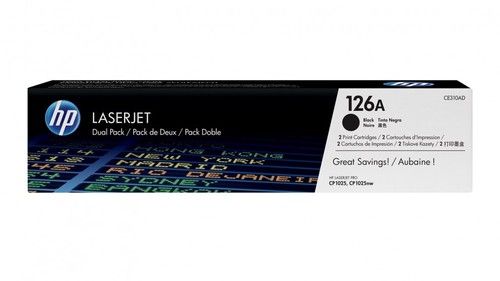
HP 126A Laserjet Toner Cartridge
4300 INR
Product Details:
- Product Type Cartridges
- Storage Instructions Store in a cool, dry place
- Color Black, Cyan, Magenta, Yellow
- Printing Speed Depends on printer model
- Lead Time Ready stock
- Print Technology Laser
- Height Approx. 100 mm
- Click to View more
X
HP 126A Laserjet Toner Cartridge Price And Quantity
- 4300 INR
- 2 Piece
HP 126A Laserjet Toner Cartridge Product Specifications
- Black: 0.6 kg (approx.), Color: 0.5 kg (approx.)
- Depends on printer model
- Ready stock
- Approx. 100 mm
- Laser
- Cartridges
- Store in a cool, dry place
- Black, Cyan, Magenta, Yellow
- HP
- Black: ~1,200 pages, Color: ~1,000 pages (per cartridge at 5% coverage)
- Standard
- Laserjet
- Standard
- A4
- HP LaserJet Pro CP1025, CP1025nw; LaserJet Pro 100 Color MFP M175a, M175nw, M176, M177 series printers
- Easy to install, reliable results, sharp color graphics, consistent printing
- 126A (CE310A/CE311A/CE312A/CE313A)
- Toner
- One cartridge per box
- 20% to 80% RH
- -20 to 40 °C
- 24 months (unopened)
- 15 to 25 °C
- Black: 1,200 pages, Color: 1,000 pages (each at 5% coverage)
- Designed for HP Color LaserJet Pro printers using 126A series
HP 126A Laserjet Toner Cartridge Trade Information
- 2 Days
- Asia
- All India
Product Description
- HP 126A (CE310A) toner cartridges work with: HP Laser Jet Pro 100, CP1025. HP Top Shot Laser Jet Pro M275.
- Original HP toner cartridges produce an average of 71% more usable pages than non-HP cartridges.
- Cartridge yield (approx.): 1,200 pages
- 126A toner is designed to work with your HP printer for high quality, reliable results every print.
- What's in the Box: 1 New Original HP 126A (CE310A) toner cartridge
- Color: Black
Product information
| Product Dimensions | 3.3 x 14.3 x 3.4 inches |
| Item Weight | 10.6 ounces |
| Shipping Weight | 1 pounds |
| ASIN | B0044UCKSW |
| Item model number | CE310A |
| National Stock Number | 7510-01-603-2887 |
Consistent Printing Quality
HP 126A toner cartridges produce crisp, clear documents and vivid color graphics every time. Designed with original HP technology, they minimize print disruptions and maintain steady output, making them a reliable choice for both home and office use.
Simple Installation and Compatibility
The cartridges are easy to install into HP Color LaserJet Pro printers, specifically compatible with CP1025 series and M175/M176/M177 models. With standard size and design, users can replace old cartridges quickly for uninterrupted workflow.
Long Shelf Life and Safe Storage
With an unopened shelf life of up to 24 months, these toner cartridges provide flexibility for stocking and future use. To preserve quality, store boxes in a cool, dry place within 1525C temperature and 2080% relative humidity.
FAQs of HP 126A Laserjet Toner Cartridge:
Q: How do I install the HP 126A Laserjet Toner Cartridge in my printer?
A: Installing the HP 126A cartridge is straightforward: open your HP Color LaserJet Pro printer, remove the old cartridge, and carefully insert the new toner cartridge. Follow manufacturer instructions to ensure proper alignment and secure placement.Q: What is the page yield for the HP 126A toner cartridge, and how does coverage affect this?
A: The black cartridge yields approximately 1,200 pages, while each color cartridge (cyan, magenta, yellow) yields about 1,000 pagesboth at 5% coverage per page. Higher coverage or more dense prints may reduce the number of pages you can print.Q: When should I replace my HP 126A toner cartridge, and how do I know its time?
A: Replace the cartridge when your printer signals low toner or if printouts start showing faded colors or streaks. Regular monitoring of print quality helps ensure timely replacement and consistent document results.Q: Where can I use the HP 126A toner cartridges?
A: These cartridges are designed for specific HP Color LaserJet Pro models, such as CP1025, CP1025nw, and M175/M176/M177 series. Use them in compatible HP LaserJet printers for best results.Q: What are the storage guidelines for HP 126A toner cartridges to maintain quality?
A: For optimal shelf life and print performance, store unopened cartridges in a cool, dry environment between 1525C and 2080% relative humidity. Avoid exposure to extreme heat, cold, or moisture.Q: How do HP 126A cartridges benefit professional or everyday printing needs?
A: These cartridges deliver reliable results and sharp graphics, ensuring every page looks professional. Their consistent print quality and long shelf life make them ideal for offices, retailers, suppliers, and even home use.Q: What is inside each HP 126A toner cartridge pack?
A: Each box contains one standard HP 126A toner cartridge, available in black, cyan, magenta, or yellow, ready for installation in compatible printers.Tell us about your requirement

Price:
Quantity
Select Unit
- 50
- 100
- 200
- 250
- 500
- 1000+
Additional detail
Mobile number
Email

Other Products in 'Cartridges & Printers' category



"We are accepting local inquiries only for South India."

 Send Inquiry
Our Products
- Garbage Bins & Covers
- Paper shredder & lamination Machine
- Wipers
- Mop & Accessories
- Cleaning Cloths
- Boards
- Buckets
- Liquid Chemicals
- Cleaning Powder
- Brush
- Tissues
- Newspaper Stand
- Brooms & Dustpan
- Cups & Mugs
- Air fragrance & Dispenser
- Safety items
- Vacuum Cleaners
- Currency Counting And Shredding Machine
- Batteries
- Label Manager
- Projectors & Stands
- Foldable Table
- MONITOR ARM SOLUTIONS
- Monitor Stands
- Keyboard Drawers
- Computer Accessories
- Water Bottles
- Safety Equipments
- Projector & Projector Accessories
- Disposable Items
- Boards & Accessories
- Cleaning Chemicals
- Scrubbers
- Hand Wash Dispenser
- Hand Dryer Dispenser
- Tissue Dispenser
- Mat
- Water Bottle
- Cutlery
- Magazine Stands
- Ceramic Boards
- Ceramic Magnetic Boards
- Memory Cards & Pen Drives
- CD/DVD & Hard disk
- Stands
- Cartridges & Printers
- Stapler Pins & Machines
- Covers & Envelopes
- Files & Folders
- Permanent Marker&CD/DVD Markers
- Pens&Pencils
- Sketch Pens
- Correction Pens
- Calculator
- Packaging & Adhesive Materials
- Exam Pad
- Stapler Machines & Pins
- Photo Glossy Paper
- Sketch Pens & Crayons
- Photo Glossy & Carbon Paper
- Erasers & Sharpener
- Office Needs
- Cutters & Scissors
- Chalk & Dusters
- Notebooks & Registers
- Lables
- Labels
- Other Items

No.29/15, Subbedar Hussain St, Padupakkam, Royapettah, Chennai - 600014, Tamil Nadu, India

Mr Ajit Shanaz
(Marketing Executive)
Mobile :07971191065
 Send Inquiry
 Send SMS
Developed and Managed by Infocom Network Private Limited.
