
Call us now :07971191065
 Send Inquiry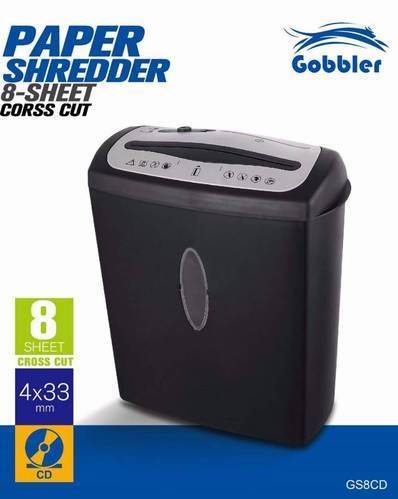
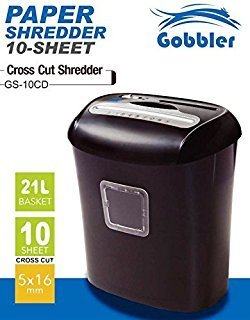
Gobbler GS8CD Paper Shredding Machine
4100 INR
Product Details:
- Product Type Shredder
- Model No GS8CD
- Material ABS Plastic, Steel blades
- Usage Paper, Credit Card, Small Staples
- Function Cross Cut Paper and Credit Card Shredding
- Size 330 x 160 x 310 mm
- Weight 3.5 kg
- Click to View more
X
Gobbler GS8CD Paper Shredding Machine Price And Quantity
- 4100 INR
- 1 Piece
Gobbler GS8CD Paper Shredding Machine Product Specifications
- Shredder
- Paper, Credit Card, Small Staples
- Cross Cut Paper and Credit Card Shredding
- 330 x 160 x 310 mm
- No
- GS8CD
- 3.5 kg
- Compact Design, Low Noise Operation, Easy to Use
- Auto Start/Stop, Overheat Protection, Reverse Function
- ABS Plastic, Steel blades
- Office and Home Paper Shredding
- A4
- 8 sheets per pass
- Overheat and Overload Protection Indicator
- Cross Cut
- Less than 72 dB
- 4 x 35 mm
- CDs, Credit Cards, Paper
- Manual Feed
- 220V AC, 50Hz
- 2 minutes On / 30 minutes Off (cooling)
- 15 Liters
Gobbler GS8CD Paper Shredding Machine Trade Information
- 2 Days
- Asia
- All India
Product Description
Automatic Grade:Automatic, Manual Shredding
Machine Type:Cross-Cut
Output Paper Size:0-2 mm, 2-4 mm, 4-6 mm, 6-10 mm, 10-15 mm, >15 mm, >15 mm,>15 mm,0-2 mm,2-4 mm,4-6 mm,6-10 mm,10-15 mm,>15 mm,0-2 mm,2-4 mm,4-6 mm,6-10 mm,10-15 mm,>15 mm
Usage:Industrial, Commercial
Domestic Capacity:0-20 kg/hr
Shredding Capacity:1-500 kg/hr
Auto Start and Stop:Yes
Shreds Staples:No
Minimum Order Quantity:1 Piece
Secure Shredding for Any Workspace
The Gobbler GS8CD Paper Shredding Machine is engineered to safeguard your confidential information, whether at home or in the office. Its cross-cut design turns papers, credit cards, and CDs into unreadable pieces, offering robust security. With advanced protection indicators, low noise operation, and an intuitive interface, it assures peace of mind and seamless user experience.
Efficient Performance and Capacity
This shredder can process up to 8 sheets per pass, as well as credit cards and CDs, without hassle. Its 15-liter waste bin provides ample room, minimizing frequent emptying. The 2-minute continuous run time followed by a 30-minute cooling period allows for efficient short bursts of use, perfectly suited for everyday shredding needs.
FAQs of Gobbler GS8CD Paper Shredding Machine:
Q: How does the Gobbler GS8CD ensure the secure disposal of documents?
A: The GS8CD uses a cross-cut mechanism that slices paper, credit cards, and CDs into 4 x 35 mm pieces, making reconstruction virtually impossible and providing reliable protection against data theft.Q: What types of materials can I shred with this machine?
A: You can shred paper (including documents with small staples), credit cards, and CDs using the manual feed slot of the Gobbler GS8CD.Q: When should I use the cooling-off period, and why is it important?
A: After every 2 minutes of operation, allow the shredder 30 minutes to cool down as per specifications. This prevents overheating and extends the machines lifespan.Q: Where can I use the Gobbler GS8CD Paper Shredder?
A: The GS8CDs compact and lightweight design makes it suitable for both office and home use, easily fitting into small spaces or under desks.Q: What is the process for shredding credit cards or CDs with this machine?
A: Simply insert your credit card or CD into the designated manual feed slot and activate the shredder. The machines steel blades will efficiently cut the material into small fragments.Q: How does the overheat and overload protection indicator benefit me?
A: These indicators alert you when the machine is overloaded or overheated, allowing for prompt action to avoid damage, ensure safe use, and maintain optimal performance.Tell us about your requirement

Price:
Quantity
Select Unit
- 50
- 100
- 200
- 250
- 500
- 1000+
Additional detail
Mobile number
Email

Other Products in 'Paper shredder & lamination Machine' category

"We are accepting local inquiries only for South India."

 Send Inquiry
Our Products
- Garbage Bins & Covers
- Paper shredder & lamination Machine
- Wipers
- Mop & Accessories
- Cleaning Cloths
- Boards
- Buckets
- Liquid Chemicals
- Cleaning Powder
- Brush
- Tissues
- Newspaper Stand
- Brooms & Dustpan
- Cups & Mugs
- Air fragrance & Dispenser
- Safety items
- Vacuum Cleaners
- Currency Counting And Shredding Machine
- Batteries
- Label Manager
- Projectors & Stands
- Foldable Table
- MONITOR ARM SOLUTIONS
- Monitor Stands
- Keyboard Drawers
- Computer Accessories
- Water Bottles
- Safety Equipments
- Projector & Projector Accessories
- Disposable Items
- Boards & Accessories
- Cleaning Chemicals
- Scrubbers
- Hand Wash Dispenser
- Hand Dryer Dispenser
- Tissue Dispenser
- Mat
- Water Bottle
- Cutlery
- Magazine Stands
- Ceramic Boards
- Ceramic Magnetic Boards
- Memory Cards & Pen Drives
- CD/DVD & Hard disk
- Stands
- Cartridges & Printers
- Stapler Pins & Machines
- Covers & Envelopes
- Files & Folders
- Permanent Marker&CD/DVD Markers
- Pens&Pencils
- Sketch Pens
- Correction Pens
- Calculator
- Packaging & Adhesive Materials
- Exam Pad
- Stapler Machines & Pins
- Photo Glossy Paper
- Sketch Pens & Crayons
- Photo Glossy & Carbon Paper
- Erasers & Sharpener
- Office Needs
- Cutters & Scissors
- Chalk & Dusters
- Notebooks & Registers
- Lables
- Labels
- Other Items

No.29/15, Subbedar Hussain St, Padupakkam, Royapettah, Chennai - 600014, Tamil Nadu, India

Mr Ajit Shanaz
(Marketing Executive)
Mobile :07971191065
 Send Inquiry
 Send SMS
Developed and Managed by Infocom Network Private Limited.
