
Call us now :07971191065
 Send Inquiry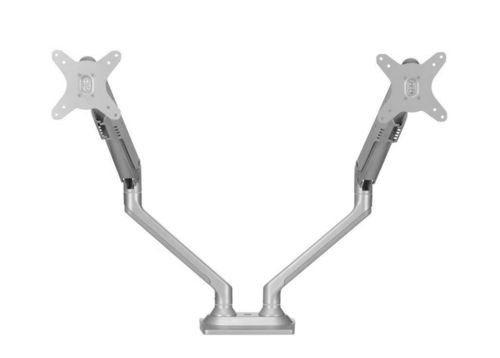
EasyMove Dual Screen Monitor Arm-Innofitt
16350 INR/Piece
Product Details:
- Product Type Dual Screen Monitor Arm
- Model No EasyMove Dual Screen Monitor Arm
- Material High-grade aluminum and steel
- Usage Suitable for flat screen and curved monitors
- Function Holds and supports two monitors simultaneously
- Size Supports monitors up to 27 inches each
- Weight Approx. 6.2 kg
- Click to View more
X
EasyMove Dual Screen Monitor Arm-Innofitt Price And Quantity
- 1 , , Piece
- 16350 INR/Piece
EasyMove Dual Screen Monitor Arm-Innofitt Product Specifications
- High-grade aluminum and steel
- EasyMove Dual Screen Monitor Arm
- Max load capacity of 8 kg per arm
- Dual Screen Monitor Arm
- Improves ergonomic comfort, saves desk space, flexible positioning
- Height adjustable, 360° rotation, cable management, VESA compliant
- Dual monitor setup for office, workstation, or home use
- Suitable for flat screen and curved monitors
- Approx. 6.2 kg
- Supports monitors up to 27 inches each
- Holds and supports two monitors simultaneously
- Powder coated, scratch-resistant finish
- 180° swivel
- Easy tool-free installation
- Fully adjustable arms for height, tilt, swivel, and rotation
- 360° rotation for portrait/landscape mode
- Desk clamp and grommet options provided
- Integrated cable management system
- Supports VESA 75x75mm and 100x100mm
- +90° / -45° tilt adjustment
- Silver and Black
- 13 inch to 27 inch monitors
- Anti-slip pads and secure locking mechanism
EasyMove Dual Screen Monitor Arm-Innofitt Trade Information
- 2 Days
- South India
Product Description
Features
- EasyMove Dual Screen Monitor Arms
- Extremely easy to adjust to desired position
- Height and distance adjustable
- Tilt, Swivel, Bend and Pivot Functions
- Size of monitor upto 27"
- Concealed cable management
- Rugged Gas Spring Mechanism
Flexible Positioning and Ergonomic Comfort
The EasyMove Dual Screen Monitor Arm lets you adjust your monitors for optimal viewingimproving posture and reducing strain on your neck and eyes. Its high-grade aluminum and steel build ensures durability, while the powder-coated finish resists scratches, maintaining a sleek appearance in any workspace.
Effortless Installation and Compatibility
Setup is straightforward, thanks to tool-free installation, desk clamp, and grommet mounting options. The arm supports VESA 75x75mm or 100x100mm, accommodating most 13 to 27 inch monitors. Whether you use flat or curved displays, this arm fits seamlessly into any office, home, or workstation environment.
Organized Workspace with Integrated Cable Management
Say goodbye to clutter with the cleverly integrated cable management system. Cables are concealed within the arm, preserving desk space and creating a tidy, professional look. The anti-slip pads and secure locking mechanism ensure safety and stability throughout daily use.
FAQs of EasyMove Dual Screen Monitor Arm-Innofitt:
Q: How do I install the EasyMove Dual Screen Monitor Arm, and what mounting options are provided?
A: Installation is simple and tool-free, with both desk clamp and grommet options included. You can mount the arm securely on most desks or tables, following the clear instructions provided in the package.Q: What monitor sizes and weights does the EasyMove Dual Screen Monitor Arm support?
A: The arm is designed for monitors ranging from 13 to 27 inches and can hold up to 8 kg per arm. It supports both flat screen and curved monitors with VESA 75x75mm or 100x100mm mounting patterns.Q: How adjustable are the arms, and what types of monitor positioning are possible?
A: The arms are fully adjustable, offering +90/-45 tilt, 180 swivel, and 360 rotation. This lets you set your monitors in portrait or landscape mode and adjust height for individualized ergonomic comfort.Q: When should I consider using a dual monitor arm in my workspace?
A: A dual monitor arm is recommended when you want to maximize desk space, improve ergonomics, or frequently switch between different viewing angles for multitasking, design, or office work.Q: Where can the EasyMove Dual Screen Monitor Arm be used?
A: This arm is suitable for offices, home workstations, trading rooms, and design studios. Its modern silver and black finish blends well with a variety of environments and digital setups.Q: What makes the cable management system beneficial in daily use?
A: The integrated cable management keeps power and data cables organized and hidden, minimizing clutter and enhancing the overall appearance and safety of your workspace.Tell us about your requirement

Price:
Quantity
Select Unit
- 50
- 100
- 200
- 250
- 500
- 1000+
Additional detail
Mobile number
Email

Other Products in 'MONITOR ARM SOLUTIONS' category


"We are accepting local inquiries only for South India."

 Send Inquiry
Our Products
- Garbage Bins & Covers
- Paper shredder & lamination Machine
- Wipers
- Mop & Accessories
- Cleaning Cloths
- Boards
- Buckets
- Liquid Chemicals
- Cleaning Powder
- Brush
- Tissues
- Newspaper Stand
- Brooms & Dustpan
- Cups & Mugs
- Air fragrance & Dispenser
- Safety items
- Vacuum Cleaners
- Currency Counting And Shredding Machine
- Batteries
- Label Manager
- Projectors & Stands
- Foldable Table
- MONITOR ARM SOLUTIONS
- Monitor Stands
- Keyboard Drawers
- Computer Accessories
- Water Bottles
- Safety Equipments
- Projector & Projector Accessories
- Disposable Items
- Boards & Accessories
- Cleaning Chemicals
- Scrubbers
- Hand Wash Dispenser
- Hand Dryer Dispenser
- Tissue Dispenser
- Mat
- Water Bottle
- Cutlery
- Magazine Stands
- Ceramic Boards
- Ceramic Magnetic Boards
- Memory Cards & Pen Drives
- CD/DVD & Hard disk
- Stands
- Cartridges & Printers
- Stapler Pins & Machines
- Covers & Envelopes
- Files & Folders
- Permanent Marker&CD/DVD Markers
- Pens&Pencils
- Sketch Pens
- Correction Pens
- Calculator
- Packaging & Adhesive Materials
- Exam Pad
- Stapler Machines & Pins
- Photo Glossy Paper
- Sketch Pens & Crayons
- Photo Glossy & Carbon Paper
- Erasers & Sharpener
- Office Needs
- Cutters & Scissors
- Chalk & Dusters
- Notebooks & Registers
- Lables
- Labels
- Other Items

No.29/15, Subbedar Hussain St, Padupakkam, Royapettah, Chennai - 600014, Tamil Nadu, India

Mr Ajit Shanaz
(Marketing Executive)
Mobile :07971191065
 Send Inquiry
 Send SMS
Developed and Managed by Infocom Network Private Limited.
