
Call us now :07971191065
 Send Inquiry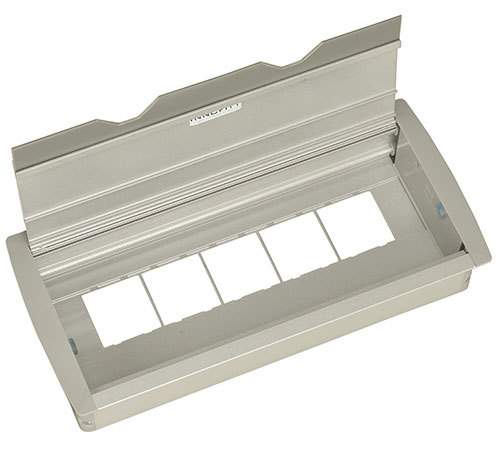
Deskport FTB 154-10 Module
Product Details:
- Model No FTB 154-10
- Product Type Modular Desk Port Module
- Material Anodized Aluminium with Plastic Sockets
- Usage Power and Data Connectivity for Work Desks
- Function Provides Multi-Connectivity Ports for Desk Integration
- Size 154 mm x 100 mm (approx.)
- Weight Approx. 750 g
- Click to View more
X
Deskport FTB 154-10 Module Price And Quantity
Deskport FTB 154-10 Module Product Specifications
- Provides Multi-Connectivity Ports for Desk Integration
- Modular, Removable Socket System, Easy Installation, Flip Cover Design
- FTB 154-10
- Modular Desk Port Module
- Commercial Office Workstations, Meeting Rooms, Conference Tables
- Multiple Ports - VGA, HDMI, USB, Data, Audio, LAN
- Space-Saving, Organized Cable Management, Enhanced Accessibility
- 154 mm x 100 mm (approx.)
- Power and Data Connectivity for Work Desks
- Approx. 750 g
- Anodized Aluminium with Plastic Sockets
- Universal OS Support (depends on connected hardware)
- Supports Multiple Connectors Simultaneously
- Matte Silver Anodized
- Mounting Screws and User Manual
- Desk Top/Flush Mount
- 250V AC 50Hz (for power sockets)
- Bottom/Side Cable Entry
- 150 mm x 96 mm (approx.)
- Flip Open Lid
- Customizable as per requirement
Deskport FTB 154-10 Module Trade Information
- 2 Days
- Asia
- South India
Product Description
- 10 Module
- Compatible with Roma/Crabtree switches
- Colour:Metallic Silver Grey
- Optional Accessories :USB Charger, Data Port , HDMI, VGA, 3.5 Audio
- Box dimension :154 x 332 mm
- Cut out size :132 x 316 mm
Customizable Multi-Connectivity Interface
Deskport FTB 154-10 is engineered to facilitate power and data connectivity for modern workspaces. With modular and removable sockets, users can personalize configurations to meet diverse technical requirements. The flip cover design not only preserves aesthetics but also protects components, while the space-saving size keeps workstations organized and uncluttered.
Effortless Installation & Enhanced Cable Management
This module supports both desktop and flush mounting, featuring mounting screws and a user manual for straightforward setup. Bottom and side cable entry options, along with organized cable routing, simplify installation and future maintenance. Its innovative design maximizes desk space and provides enhanced accessibility for all users.
FAQs of Deskport FTB 154-10 Module:
Q: How is the Deskport FTB 154-10 Module installed on a workstation?
A: The Deskport FTB 154-10 Module is designed for easy installation, supporting both desk top and flush mount setups. Mounting screws and a user manual are included to guide users through the process. The desk or table requires a cutout of approximately 150 mm x 96 mm, after which the module is securely fixed using the provided accessories.Q: What connectivity options does the Deskport FTB 154-10 provide?
A: This module offers multiple ports, including VGA, HDMI, USB, LAN, audio, data, and customizable power sockets rated at 250V AC 50Hz. Its modular, removable socket system allows tailoring the configuration to suit specific commercial or office requirements.Q: When should I consider using this module in office setups?
A: The Deskport FTB 154-10 is ideal for commercial office workstations, meeting rooms, and conference tables where organized access to power and multiple data ports is essential. It can be installed during new workstation setups or as part of office upgrades to improve connectivity and cable management.Q: Where do the cables enter and exit the module for tidy cable management?
A: The module is equipped with bottom and side cable entry points, allowing flexible routing options based on desk layout. This design supports organized cable management and contributes to a clutter-free workspace.Q: What benefits does the flip-cover design offer?
A: The flip-open lid protects connectivity ports from dust and damage when not in use, maintains a clean appearance, and provides convenient, quick access to sockets, ensuring they remain easily accessible yet discretely integrated.Q: How does the module enhance productivity in meeting rooms and office workstations?
A: By providing multiple configurable connectivity options and efficient cable management in a compact design, the Deskport FTB 154-10 streamlines device integration, simplifies conference setups, and supports simultaneous use of various connectors, enhancing overall workspace productivity.Q: Is the Deskport FTB 154-10 compatible with all operating systems?
A: The module supports universal OS compatibility, as its functionality depends on the connected hardware devices, making it suitable for a wide range of desktops, laptops, and AV equipment used in office environments.Tell us about your requirement

Price:
Quantity
Select Unit
- 50
- 100
- 200
- 250
- 500
- 1000+
Additional detail
Mobile number
Email

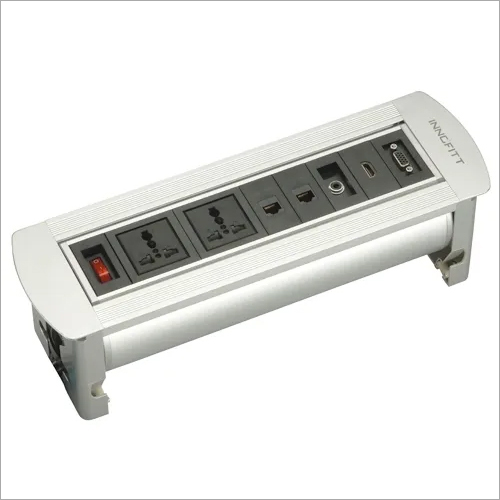
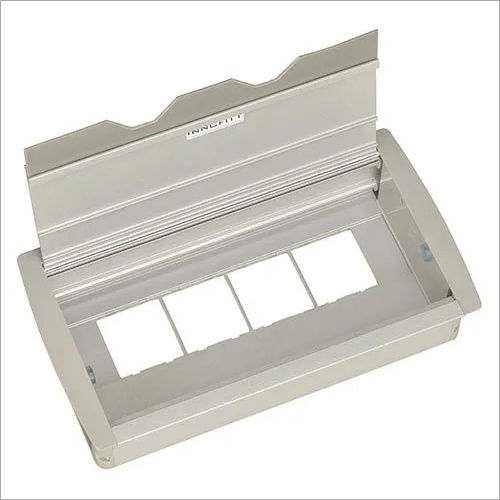
Other Products in 'MONITOR ARM SOLUTIONS' category



"We are accepting local inquiries only for South India."

 Send Inquiry
Our Products
- Garbage Bins & Covers
- Paper shredder & lamination Machine
- Wipers
- Mop & Accessories
- Cleaning Cloths
- Boards
- Buckets
- Liquid Chemicals
- Cleaning Powder
- Brush
- Tissues
- Newspaper Stand
- Brooms & Dustpan
- Cups & Mugs
- Air fragrance & Dispenser
- Safety items
- Vacuum Cleaners
- Currency Counting And Shredding Machine
- Batteries
- Label Manager
- Projectors & Stands
- Foldable Table
- MONITOR ARM SOLUTIONS
- Monitor Stands
- Keyboard Drawers
- Computer Accessories
- Water Bottles
- Safety Equipments
- Projector & Projector Accessories
- Disposable Items
- Boards & Accessories
- Cleaning Chemicals
- Scrubbers
- Hand Wash Dispenser
- Hand Dryer Dispenser
- Tissue Dispenser
- Mat
- Water Bottle
- Cutlery
- Magazine Stands
- Ceramic Boards
- Ceramic Magnetic Boards
- Memory Cards & Pen Drives
- CD/DVD & Hard disk
- Stands
- Cartridges & Printers
- Stapler Pins & Machines
- Covers & Envelopes
- Files & Folders
- Permanent Marker&CD/DVD Markers
- Pens&Pencils
- Sketch Pens
- Correction Pens
- Calculator
- Packaging & Adhesive Materials
- Exam Pad
- Stapler Machines & Pins
- Photo Glossy Paper
- Sketch Pens & Crayons
- Photo Glossy & Carbon Paper
- Erasers & Sharpener
- Office Needs
- Cutters & Scissors
- Chalk & Dusters
- Notebooks & Registers
- Lables
- Labels
- Other Items

No.29/15, Subbedar Hussain St, Padupakkam, Royapettah, Chennai - 600014, Tamil Nadu, India

Mr Ajit Shanaz
(Marketing Executive)
Mobile :07971191065
 Send Inquiry
 Send SMS
Developed and Managed by Infocom Network Private Limited.
