
Call us now :07971191065
 Send Inquiry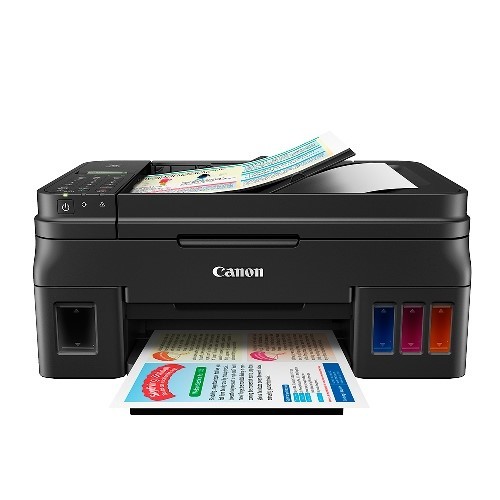
Canon Pixma G4010
17000 INR
Product Details:
- Compatible Brand Canon
- For Use In Office, Home, Small Business
- Weight 7.3 kg
- Connectivity Type USB 2.0, Wi-Fi, Wireless LAN
- Product Type Multi-function Ink Tank Printer
- Printing Speed Up to 8.8ipm (mono), 5.0ipm (color)
- Year Built 2022
- Click to View more
X
Canon Pixma G4010 Price And Quantity
- 17000 INR
- 1 Piece
Canon Pixma G4010 Product Specifications
- Office, Home, Small Business
- Canon
- Approx. 53.5 dB(A)
- 7.3 kg
- USB 2.0, Wi-Fi, Wireless LAN
- 2 to 4 Working Days
- GI-790 (Black, Cyan, Magenta, Yellow)
- Up to 8.8ipm (mono), 5.0ipm (color)
- High Yield Ink Tank System (up to 7,000 pages)
- Multi-function Ink Tank Printer
- 2022
- Store in a cool, dry place
- 197 mm
- A4, A5, B5, Letter, Legal, Envelope (DL, COM10)
- Standard Model
- Print, Copy, Scan, Fax, Wi-Fi, Auto Document Feeder
- Inkjet
- PIXMA G4010
- AC 100-240V, 50/60Hz
- 445 x 330 x 197 mm
- Black
- All-in-One Inkjet Printer
- Up to 100 Sheets
- 4800 x 1200 dpi
- Up to 20 Sheets
- Flatbed & ADF
- Supported (A4, Letter, Photo)
- Up to 33.6 kbps
- Windows, Mac OS, Mobile (iOS/Android)
- Refillable Ink Tank System
- 2-Line LCD Display
- Wi-Fi Direct, Wireless LAN
- Recommended up to 1,500 pages
Canon Pixma G4010 Trade Information
- 2 Days
- All India
Product Description
Feature
Printer Type - Ink Tank, Functionality - All-in-One (Print, Scan, Copy, Fax) , Printer Output - Color
Connectivity - Wi-Fi, USB, Canon Selphy App (Direct Mobile Printing), Display - 2 Line LCD
Pages per minute - 8.8 pages (Black & White), 5 pages (Colour), Cost per page - 8 paise (Black & White), 21 paise (Colour) - As per ISO standards
Ideal usage - Home and Small office, Regular / Heavy usage (more than 300 pages per month)
Page size supported - 4.0"x6.0" till A4 / Letter / Legal / A5 / B5, Duplex Print - Manual, Print resolution - 4800x1200
Compatible Ink Bottle - GI-790 (Black), GI-790 (Cyan, Magenta, Yellow), Page Yield - 7000 pages, Comes with 1 each of all 4 ink bottles inside the box
Technical Details
| Brand | Canon |
| Colour | Black |
| Item Height | 16.3 Centimeters |
| Item Width | 44.5 Centimeters |
| Item Weight | 6 Kg |
| Product Dimensions | 33 x 44.5 x 16.3 cm |
| Item model number | CNN_G4010_BLK |
| Connectivity Type | Wi-Fi |
| Wattage | 11 Watts |
| Included Components | Printer |
Efficient High-Yield Printing
Experience uninterrupted productivity with Canon Pixma G4010s refillable ink tank system. Achieve up to 7,000 pages per tank, reducing frequent cartridge changes and printing costs. Its robust design, combined with a recommended duty cycle of up to 1,500 pages per month, makes it well-suited for office and small business environments.
Versatile Connectivity and Ease of Use
With Wi-Fi Direct, wireless LAN, and USB 2.0, the Pixma G4010 connects effortlessly to computers and mobile devices. The 2-line LCD display simplifies navigation, while support for Windows, Mac OS, iOS, and Android ensures broad compatibility, maximizing accessibility wherever you work.
All-in-One Functionality for Enhanced Workflow
Print, copy, scan, and fax with one compact device. The integrated flatbed and automatic document feeder (ADF) support multi-page scanning and copying up to 20 sheets, streamlining document management. Borderless printing is available for vibrant photos and presentations.
FAQs of Canon Pixma G4010:
Q: How do I set up the Canon Pixma G4010 for wireless printing?
A: To set up wireless printing, power on the printer and press the Wi-Fi button until the Wi-Fi lamp flashes. Use the Canon Print app on your mobile device or the printer driver on your computer, and follow the on-screen instructions to connect the printer to your network. Detailed steps are available in the user manual.Q: What is the benefit of the refillable ink tank system in the Pixma G4010?
A: The refillable ink tank system allows you to print up to 7,000 pages per refill, minimizing downtime and significantly reducing printing costs compared to traditional cartridges. Its ideal for high-volume environments and ensures consistent, high-quality output.Q: Where can I use the Canon Pixma G4010?
A: The Canon Pixma G4010 is suitable for offices, homes, and small businesses, thanks to its compact design, versatile features, and reliable performance. Its flexible connectivity and functionality make it an excellent choice anywhere efficient document management is needed.Q: What types and sizes of paper does the Pixma G4010 support?
A: This printer supports a variety of paper sizes, including A4, A5, B5, Letter, Legal, and envelopes (DL, COM10). Borderless printing is available on A4, Letter, and photo-sized paper, offering greater flexibility for documents and creative projects.Q: Can I use my smartphone to print documents on the Canon Pixma G4010?
A: Yes, the Pixma G4010 is compatible with mobile printing via iOS and Android devices. Download the Canon Print app to your smartphone or tablet, connect to the printer via Wi-Fi Direct or wireless LAN, and easily print photos, documents, or scan from your device.Q: What is the process for using the Auto Document Feeder (ADF)?
A: To use the ADF, place up to 20 sheets of documents in the feeder tray. Select your desired operation (copy, scan, or fax) on the 2-line LCD display, and the printer will automatically process each sheet sequentially, saving time and effort during multi-page tasks.Q: What is the recommended monthly duty cycle for the Pixma G4010?
A: Canon recommends a monthly duty cycle of up to 1,500 pages for optimal performance and durability, ensuring reliable operation in active office or business settings.Tell us about your requirement

Price:
Quantity
Select Unit
- 50
- 100
- 200
- 250
- 500
- 1000+
Additional detail
Mobile number
Email

Other Products in 'Cartridges & Printers' category



"We are accepting local inquiries only for South India."

 Send Inquiry
Our Products
- Garbage Bins & Covers
- Paper shredder & lamination Machine
- Wipers
- Mop & Accessories
- Cleaning Cloths
- Boards
- Buckets
- Liquid Chemicals
- Cleaning Powder
- Brush
- Tissues
- Newspaper Stand
- Brooms & Dustpan
- Cups & Mugs
- Air fragrance & Dispenser
- Safety items
- Vacuum Cleaners
- Currency Counting And Shredding Machine
- Batteries
- Label Manager
- Projectors & Stands
- Foldable Table
- MONITOR ARM SOLUTIONS
- Monitor Stands
- Keyboard Drawers
- Computer Accessories
- Water Bottles
- Safety Equipments
- Projector & Projector Accessories
- Disposable Items
- Boards & Accessories
- Cleaning Chemicals
- Scrubbers
- Hand Wash Dispenser
- Hand Dryer Dispenser
- Tissue Dispenser
- Mat
- Water Bottle
- Cutlery
- Magazine Stands
- Ceramic Boards
- Ceramic Magnetic Boards
- Memory Cards & Pen Drives
- CD/DVD & Hard disk
- Stands
- Cartridges & Printers
- Stapler Pins & Machines
- Covers & Envelopes
- Files & Folders
- Permanent Marker&CD/DVD Markers
- Pens&Pencils
- Sketch Pens
- Correction Pens
- Calculator
- Packaging & Adhesive Materials
- Exam Pad
- Stapler Machines & Pins
- Photo Glossy Paper
- Sketch Pens & Crayons
- Photo Glossy & Carbon Paper
- Erasers & Sharpener
- Office Needs
- Cutters & Scissors
- Chalk & Dusters
- Notebooks & Registers
- Lables
- Labels
- Other Items

No.29/15, Subbedar Hussain St, Padupakkam, Royapettah, Chennai - 600014, Tamil Nadu, India

Mr Ajit Shanaz
(Marketing Executive)
Mobile :07971191065
 Send Inquiry
 Send SMS
Developed and Managed by Infocom Network Private Limited.
