
Call us now :07971191065
 Send Inquiry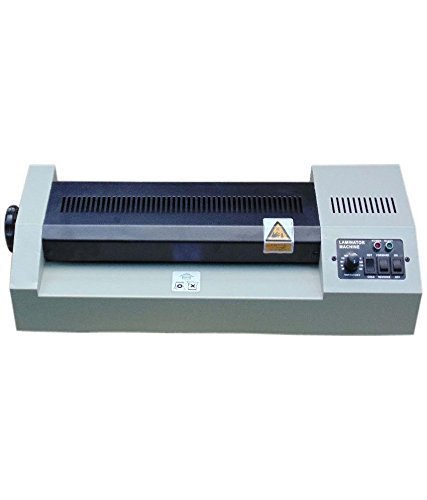
Kent KL 320 Lamination Machine
5600 INR
Product Details:
- Model No KL 320
- Product Type Lamination Machine
- Material ABS Plastic Body
- Usage Office, School, Home
- Function Laminating
- Size Portable
- Weight 2.2 kg
- Click to View more
X
Kent KL 320 Lamination Machine Price And Quantity
- 5600 INR
- 1 Piece
Kent KL 320 Lamination Machine Product Specifications
- Laminating
- 250 mm/min
- Up to 320 mm width (A3 size)
- Document and Photo Lamination
- ABS Plastic Body
- Energy Efficient, Lightweight, Easy Operation
- 2.2 kg
- Office, School, Home
- Lamination Machine
- A3
- 297 mm x 420 mm
- KL 320
- Hot & Cold Lamination, Quick Warm Up, Jam Release Function, Overheat Protection
- No
- Portable
- AC 220-240V, 50Hz
- 80-125 microns
- 350 Watts
- 490 mm x 160 mm x 82 mm
- Yes
- Indicator Light for Power and Ready
- 2 Roller
- 120°C - 160°C
- White & Grey
- 3-5 Minutes
Kent KL 320 Lamination Machine Trade Information
- 2 Days
- All India
Product Description
- Machine Overview Lamination Machine Will Make The Laminating Quick, Easy And Simple With High Performance And Innovative Features
- Sillicon Rollers Sillicon Rollers Provide The Flexibility Of Laminating With Or Without A Carrier
- Manual Knob If Anything Goes Wrong Rotate The Knob And Remove Your Project.
Efficient Lamination for Multiple Applications
Ideal for lamination tasks at home, office, or school, the Kent KL 320 is tailored to handle documents and photographs easily. Its ability to laminate up to A3 size makes it suitable for larger projects, school charts, official certificates, and personal photos, ensuring professional finishes with minimal effort.
Intuitive Operation and Quick Warm-Up
Designed for easy use, the KL 320 offers a straightforward control panel with indicator lights marking power and operating status. The quick warm-up function means its ready to use within 3-5 minutes, and the jam release switch offers peace of mind during continuous tasks.
Lightweight, Portable & Safe Design
Weighing just 2.2 kg and crafted from robust ABS plastic, the Kent KL 320 is easy to transport and set up wherever needed. Its overheat protection feature and energy-efficient performance add to user safety and comfort, providing reliable lamination every time.
FAQs of Kent KL 320 Lamination Machine:
Q: How do I operate the Kent KL 320 Lamination Machine for best results?
A: To operate the Kent KL 320, simply connect it to an AC 220-240V power supply and let it warm up for 3-5 minutes until the ready indicator lights up. Feed your document (up to A3 size) into the entry slot with the pouch, selecting hot or cold mode as needed. Use the jam release switch if you encounter paper jams.Q: What types of materials and sizes can this machine laminate?
A: The Kent KL 320 is designed to laminate documents, photographs, and card stock up to a maximum width of 320 mm (A3 size), with compatible pouch thickness between 80-125 microns. It is suitable for certificates, photos, ID cards, and more.Q: When should I use the jam release switch?
A: The jam release switch should be used when your document or photo gets stuck or misaligned during the lamination process, allowing you to safely remove the item without damaging the lamination rolls or materials.Q: Where can I use this lamination machine most effectively?
A: This compact and energy-efficient machine is suitable for use in homes for preserving photos and documents, in schools for educational materials, and in offices for laminating important paperwork or ID cards. Its portable design enables easy relocation as required.Q: What is the benefit of hot and cold lamination features?
A: Hot lamination uses heat and is ideal for standard documents and photos, providing a secure and professional finish. Cold lamination is suitable for heat-sensitive materials, such as inkjet prints, giving you versatile options for a variety of applications.Q: How does the overheat protection function enhance safety?
A: The integrated overheat protection feature automatically stops the machine from overheating, ensuring the device remains safe to use and prolonging its lifespan while preventing potential accidents.Tell us about your requirement

Price:
Quantity
Select Unit
- 50
- 100
- 200
- 250
- 500
- 1000+
Additional detail
Mobile number
Email

Other Products in 'Paper shredder & lamination Machine' category

"We are accepting local inquiries only for South India."

 Send Inquiry
Our Products
- Garbage Bins & Covers
- Paper shredder & lamination Machine
- Wipers
- Mop & Accessories
- Cleaning Cloths
- Boards
- Buckets
- Liquid Chemicals
- Cleaning Powder
- Brush
- Tissues
- Newspaper Stand
- Brooms & Dustpan
- Cups & Mugs
- Air fragrance & Dispenser
- Safety items
- Vacuum Cleaners
- Currency Counting And Shredding Machine
- Batteries
- Label Manager
- Projectors & Stands
- Foldable Table
- MONITOR ARM SOLUTIONS
- Monitor Stands
- Keyboard Drawers
- Computer Accessories
- Water Bottles
- Safety Equipments
- Projector & Projector Accessories
- Disposable Items
- Boards & Accessories
- Cleaning Chemicals
- Scrubbers
- Hand Wash Dispenser
- Hand Dryer Dispenser
- Tissue Dispenser
- Mat
- Water Bottle
- Cutlery
- Magazine Stands
- Ceramic Boards
- Ceramic Magnetic Boards
- Memory Cards & Pen Drives
- CD/DVD & Hard disk
- Stands
- Cartridges & Printers
- Stapler Pins & Machines
- Covers & Envelopes
- Files & Folders
- Permanent Marker&CD/DVD Markers
- Pens&Pencils
- Sketch Pens
- Correction Pens
- Calculator
- Packaging & Adhesive Materials
- Exam Pad
- Stapler Machines & Pins
- Photo Glossy Paper
- Sketch Pens & Crayons
- Photo Glossy & Carbon Paper
- Erasers & Sharpener
- Office Needs
- Cutters & Scissors
- Chalk & Dusters
- Notebooks & Registers
- Lables
- Labels
- Other Items

No.29/15, Subbedar Hussain St, Padupakkam, Royapettah, Chennai - 600014, Tamil Nadu, India

Mr Ajit Shanaz
(Marketing Executive)
Mobile :07971191065
 Send Inquiry
 Send SMS
Developed and Managed by Infocom Network Private Limited.
