
Call us now :07971191065
 Send Inquiry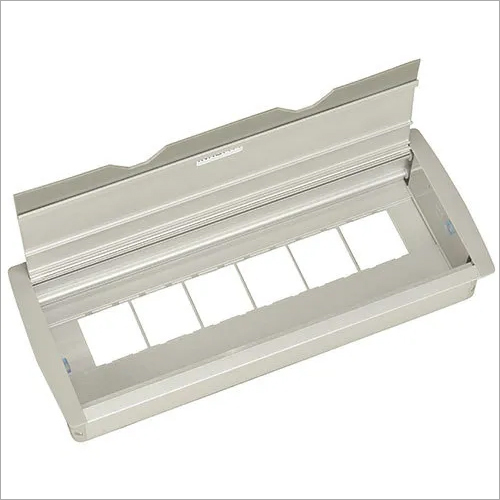
Deskport FTB 154- 12 Manual
Product Details:
- Product Type Deskport Manual Printer
- Model No FTB 154-12
- Material ABS Plastic and Metal Components
- Usage Desktop Printing
- Function Manual Document Printing
- Size 354 x 231 x 196 mm
- Weight 5.2 Kg
- Click to View more
X
Deskport FTB 154- 12 Manual Price And Quantity
Deskport FTB 154- 12 Manual Product Specifications
- Office and Personal Desktop Use
- Desktop Printing
- Input Tray: 150 Sheets
- Manual Paper Feed, Compact Design, Easy Operation
- 5.2 Kg
- USB 2.0
- Windows, Mac OS
- Deskport Manual Printer
- 354 x 231 x 196 mm
- Manual Document Printing
- FTB 154-12
- A4
- Energy Efficient, Cost-effective Printing
- 12 pages per minute
- 206 x 345 mm
- ABS Plastic and Metal Components
- Less than 35 dB
- Plain, Recycled
- 220V AC
- 5C - 35C
- Grey & Black
- 35W
Deskport FTB 154- 12 Manual Trade Information
- 2 Days
- Asia
- South India
Product Description
- 12 Module
- Compatible with Roma/Crabtree switches
- Colour:Metallic Silver Grey
- Optional Accessories :USB Charger, Data Port , HDMI, VGA, 3.5 Audio
- Box dimension :154 x 382 mm
- Cut out size :132 x 366 mm
Compact and User-Friendly Design
The Deskport FTB 154-12 Manual combines functionality with modern aesthetics, making it ideal for desktop use. Its small footprint ensures it occupies minimal space while ABS plastic and metal components offer durable construction. The manual feed feature allows users to handle various paper types easily, improving operational control and convenience for day-to-day printing tasks.
Efficient Printing for Offices and Homes
Engineered for both professional and personal environments, the Deskport FTB 154-12 supports plain and recycled paper, making it environmentally conscious. With a noise level of under 35 dB and a print speed of 12 pages per minute, you can print documents efficiently without disrupting your workspace.
FAQs of Deskport FTB 154- 12 Manual:
Q: How do I connect the Deskport FTB 154-12 to my computer?
A: You can connect the Deskport FTB 154-12 to your computer using the included USB 2.0 interface, which supports both Windows and Mac OS platforms for seamless integration.Q: What types of paper are supported by the Deskport FTB 154-12 Manual printer?
A: This printer supports both plain and recycled paper for A4-sized documents, making it suitable for everyday office or personal printing needs.Q: When should I use the manual paper feed feature?
A: The manual paper feed feature is ideal when printing on different paper types or sizes that require careful handling or when you want enhanced control over each sheet being fed into the machine.Q: Where is the best place to use the Deskport FTB 154-12 printer?
A: The Deskport FTB 154-12 is designed for desktop use, making it perfect for both office environments and personal workspaces where space-efficiency and ease of access are important.Q: What is the process for replacing paper in the input tray?
A: To replace or replenish paper, simply remove the input tray, load up to 150 sheets of plain or recycled paper (A4 size), and slide the tray back securelyensuring correct alignment for optimal performance.Q: How does this printer benefit users in terms of energy consumption and cost?
A: With a low power draw of 35W and energy-efficient operation, the Deskport FTB 154-12 helps users reduce electricity costs. Its economical printing capability also contributes to lower overall office expenses while delivering reliable performance.Tell us about your requirement

Price:
Quantity
Select Unit
- 50
- 100
- 200
- 250
- 500
- 1000+
Additional detail
Mobile number
Email

Other Products in 'MONITOR ARM SOLUTIONS' category



"We are accepting local inquiries only for South India."

 Send Inquiry
Our Products
- Garbage Bins & Covers
- Paper shredder & lamination Machine
- Wipers
- Mop & Accessories
- Cleaning Cloths
- Boards
- Buckets
- Liquid Chemicals
- Cleaning Powder
- Brush
- Tissues
- Newspaper Stand
- Brooms & Dustpan
- Cups & Mugs
- Air fragrance & Dispenser
- Safety items
- Vacuum Cleaners
- Currency Counting And Shredding Machine
- Batteries
- Label Manager
- Projectors & Stands
- Foldable Table
- MONITOR ARM SOLUTIONS
- Monitor Stands
- Keyboard Drawers
- Computer Accessories
- Water Bottles
- Safety Equipments
- Projector & Projector Accessories
- Disposable Items
- Boards & Accessories
- Cleaning Chemicals
- Scrubbers
- Hand Wash Dispenser
- Hand Dryer Dispenser
- Tissue Dispenser
- Mat
- Water Bottle
- Cutlery
- Magazine Stands
- Ceramic Boards
- Ceramic Magnetic Boards
- Memory Cards & Pen Drives
- CD/DVD & Hard disk
- Stands
- Cartridges & Printers
- Stapler Pins & Machines
- Covers & Envelopes
- Files & Folders
- Permanent Marker&CD/DVD Markers
- Pens&Pencils
- Sketch Pens
- Correction Pens
- Calculator
- Packaging & Adhesive Materials
- Exam Pad
- Stapler Machines & Pins
- Photo Glossy Paper
- Sketch Pens & Crayons
- Photo Glossy & Carbon Paper
- Erasers & Sharpener
- Office Needs
- Cutters & Scissors
- Chalk & Dusters
- Notebooks & Registers
- Lables
- Labels
- Other Items

No.29/15, Subbedar Hussain St, Padupakkam, Royapettah, Chennai - 600014, Tamil Nadu, India

Mr Ajit Shanaz
(Marketing Executive)
Mobile :07971191065
 Send Inquiry
 Send SMS
Developed and Managed by Infocom Network Private Limited.
